Appearance
Overview
The Overview is the main page of your club. It shows how the season is going, what your payroll looks like, and who plays next.
How to get here
- Open the My club group in the navigation.
- Select Overview.
What you see
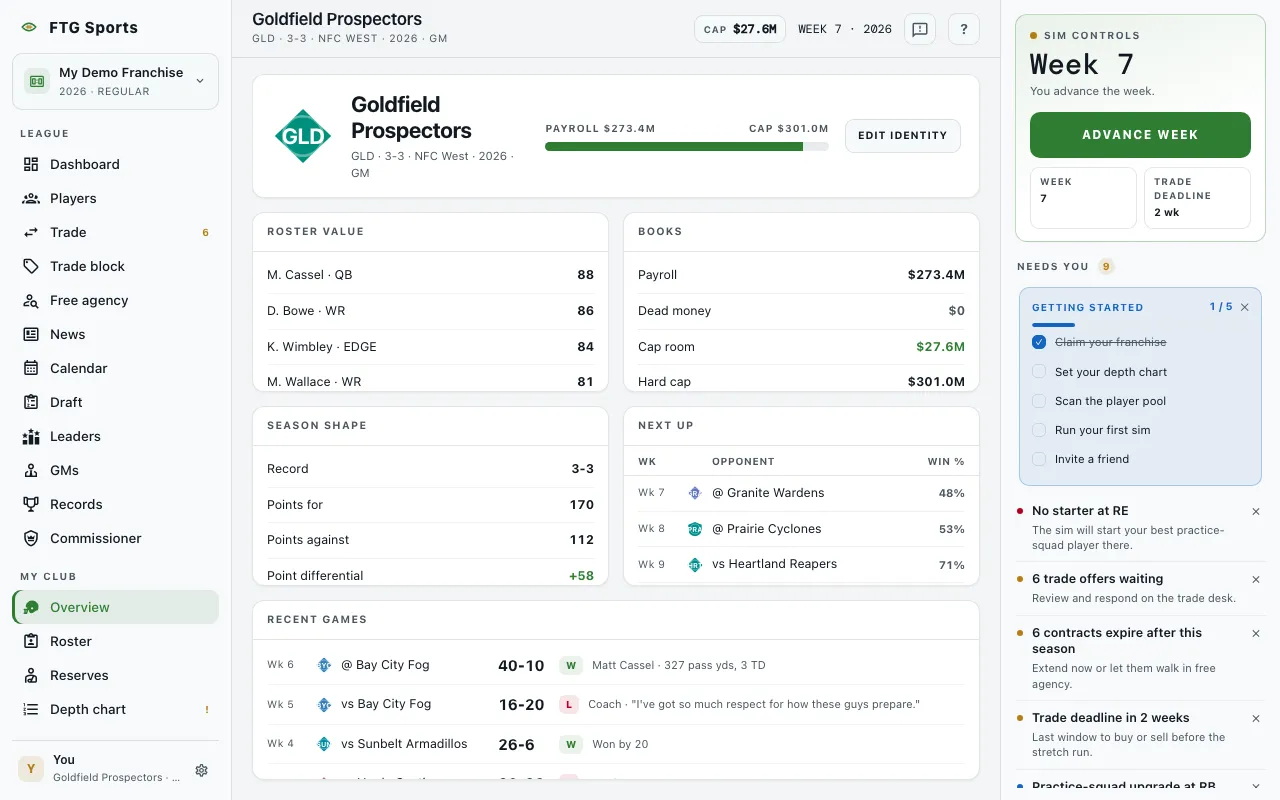
The top strip shows your crest, your club name, and a line with your abbreviation, record, division, season and owner. When money is on in your league, a payroll bar sits beside it. It reads Payroll against Cap, or against Dead when you carry dead money.
- Roster value lists your eight best active players by overall rating. Each name opens that player.
- Books lists Payroll, Dead money, Cap room, Hard cap, Expiring contracts and Cap-committed players. In the offseason it can add an Unsigned for row for the next cap year. If the commissioner turned financials off, the pane says money is hidden.
- Season shape lists Record, Points for, Points against and Point differential. Projected wins and Playoff odds appear when the game has them. The pane stays empty until your club has played.
- Next up lists your coming games by week, with the Opponent and a Win % column. The percentage is your own chance to win. When your season is over, the pane says nothing is left on the board.
- Recent games lists finished games with the week, opponent, score, a result pill and a short note. Before the season opens it says no games are played yet.
What you can do
- Opponent name: opens that club's Overview.
- Score: opens the box score for that game.
- Player name in Roster value: opens the player page.
- Edit identity: opens a dialog to change your club's name, abbreviation and colors. It shows only if you manage the club, and only in the public edition.