Appearance
Calendar
This screen shows where the league year stands, how long trading stays open, whether free agency is taking bids, and what moved lately. Open it when you ask "what happens next?"
How to get here
- In the left rail, find the League group.
- Click Calendar.
What you see
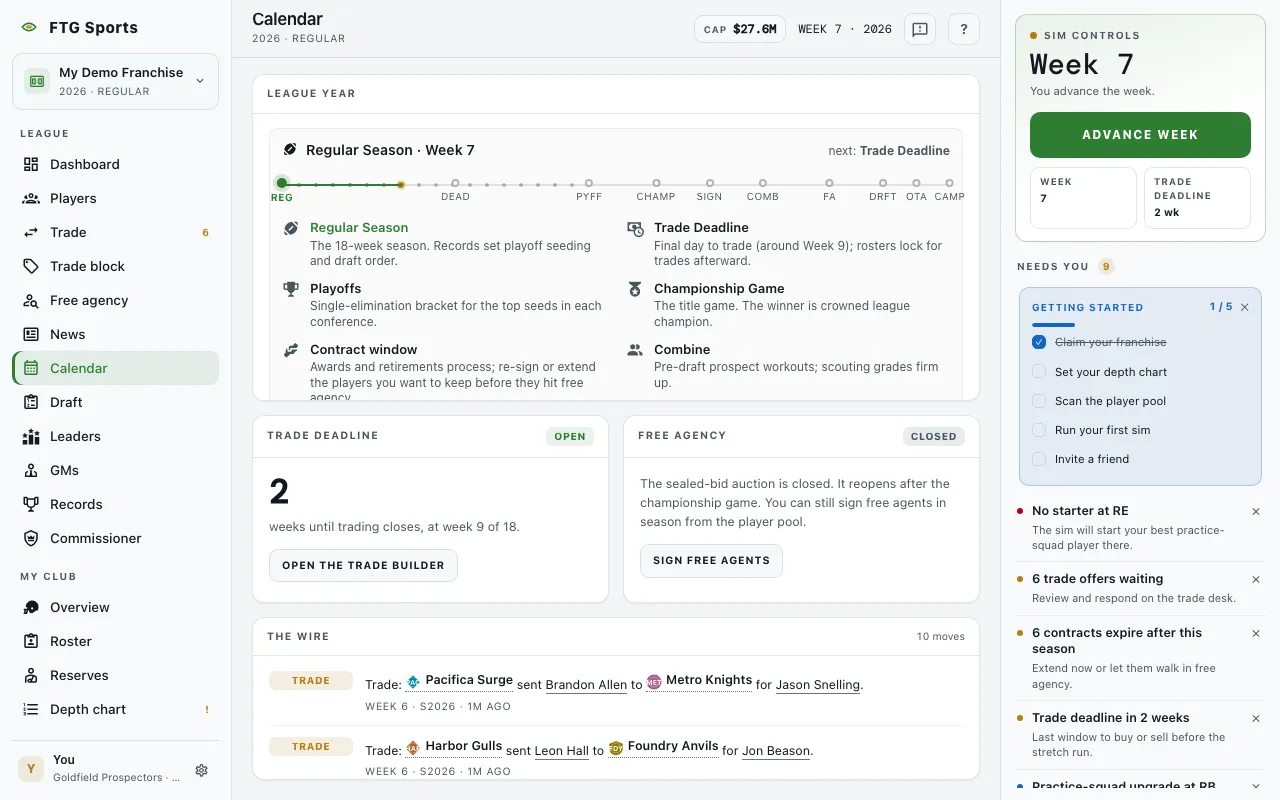
- League year pane: the full year as a numbered ribbon of stages. The stages run from Regular Season through Trade Deadline, Playoffs, Championship Game, Contract window, Combine, Free Agency, Draft, OTAs and Training Camp. The current stage is marked. A legend explains each one. Before a schedule exists, the pane says "No season on the books".
- Trade deadline pane: a status chip in the header, then the number of weeks until trading closes. The text says trading closes "at week 9 of 18". After the deadline, the pane says players stay put until the offseason, but pick swaps stay legal outside the draft itself. Before any games exist, it says the clock starts when the league draws its schedule.
- Free agency pane: a chip that reads open or closed. When the window is open, you see the Round (with the total rounds when known) and Bids this round. When it is closed, the pane says the sealed-bid auction reopens after the championship game. You can still sign free agents in season from the player pool.
- The wire pane: a list of recent signings, trades, cuts and retirements, each with a type chip. A count such as "12 moves" sits in the header. With no news, it says "Quiet day at the front office".
What you can do
- Open the trade builder: appears while trading is open. It goes to the trade screen.
- Open the FA pool: appears while the auction is open. It goes to free agency.
- Sign free agents: appears while the auction is closed. It goes to the player pool.
- Names in The wire: click a player or team name to open it.
- Retry: each pane has its own Retry. One pane failing does not blank the others.