Appearance
Player
A player's full page. It shows the ratings, the deal, the stats and history, and gives you the moves you can make on that player.
How to get here
- Open Players in the left rail under League.
- Select a player's name, or open the player's row and select Full profile.
You can also reach it from a player name in a trade, in free agency, or in the news.
What you see
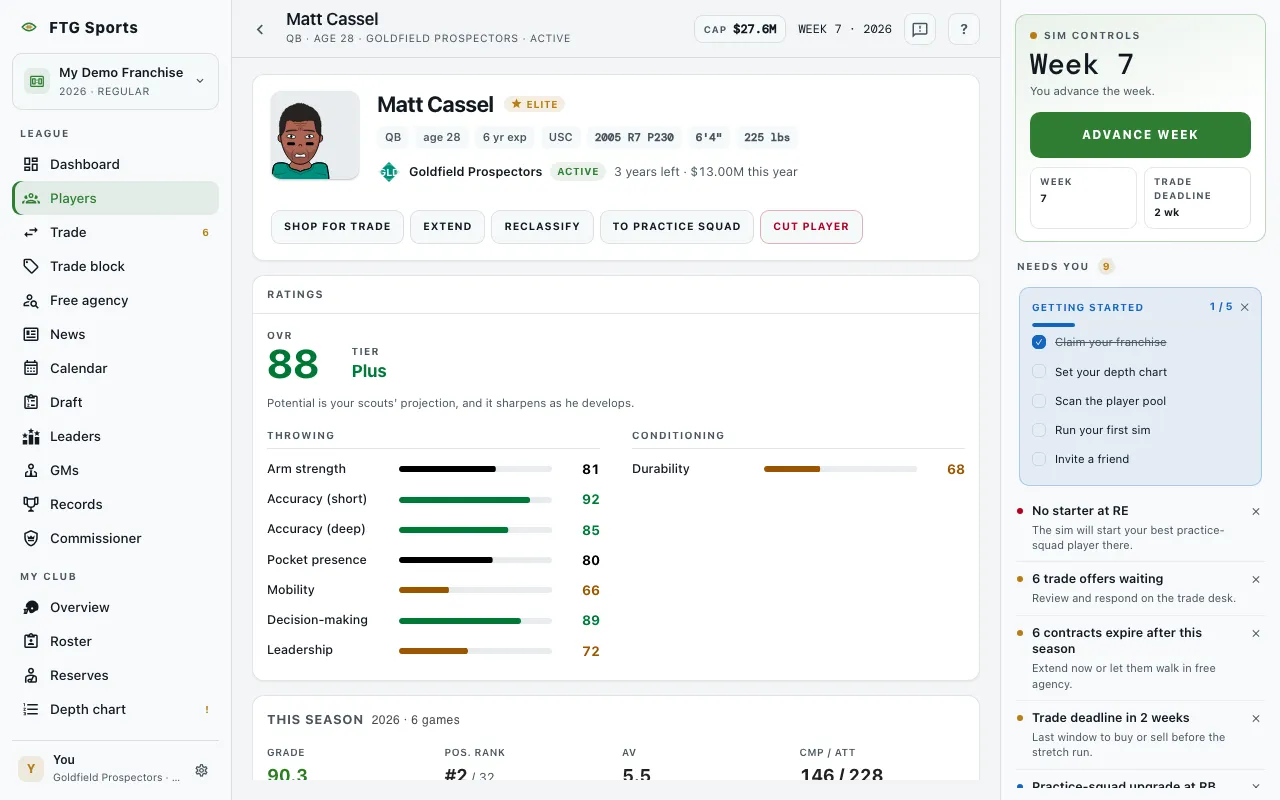
- Header: his headshot, position, club (or Free agent), injury status with a return week if the player is hurt, and the deal. A free agent shows no team. An unsigned player shows Unsigned.
- Ratings: OVR with his potential, and Tier. A note reads "Potential is your scouts' projection, and it sharpens as he develops." Below are his attribute ratings in groups, with bars. The attribute ratings are your scouts' read, not exact values. A weaker staff reads them less closely, and another club sees different numbers. This is also true for your own players.
- This season: after the player has played, the season stats. Before that, Projected role, Snap share, Position group and Tier, with a note that the line fills in as games run.
- Recent games and Career stats, when he has any.
- Notes: your private note on this player. It saves itself as you type. It reads "New club, clean page." when an earlier note was deleted because he changed clubs. See My notes.
- Injury history: a table with Injury, Season, Wk, Out and Status. It shows only if the player has been hurt. Select a header to sort.
- Scouting: only for a draft prospect on your own board. It shows Consensus ceiling and Your ceiling read, with tags when the two differ.
- A column of cards for his salary history, career timeline, grade timeline and development, and an Achievements pane when he has earned any.
- Grade timeline: his game grade week by week this season. Once he has two or more seasons, a Season / Career toggle shows. Career shows each season's game grade, with an OVR by season panel above it. The game stores each season's OVR from the 2026-10-19 update on, so an earlier season has no OVR point. Under the chart, a solid bar shows his OVR and a dashed bar shows his POT, marked as your scouts' read.
- Player not found when the id matches nobody in the league.
What you can do
Which buttons show depends on whose player he is.
- Propose trade: on a player at another club. Opens Trade with that player already in the deal.
- Shop for trade: on a player of yours who is active or on the practice squad. Opens Trade with the shop dialog for that player loaded.
- Extend: on a player of yours. Opens the extension form.
- Reclassify: on a player of yours. Opens the position-change form.
- Promote: on a practice squad player of yours. Moves the player to the active roster.
- To practice squad: on an active player of yours. Moves the player to the practice squad.
- Cut player: on a player of yours. Opens a confirmation first.