Appearance
GMs
This screen ranks every general manager in the league by a score. The score measures value, not talent: what a GM's roster produced against what it cost. Use it to see how you compare and to open any GM's full record.
How to get here
- In the left rail, find the League group.
- Click GMs.
What you see
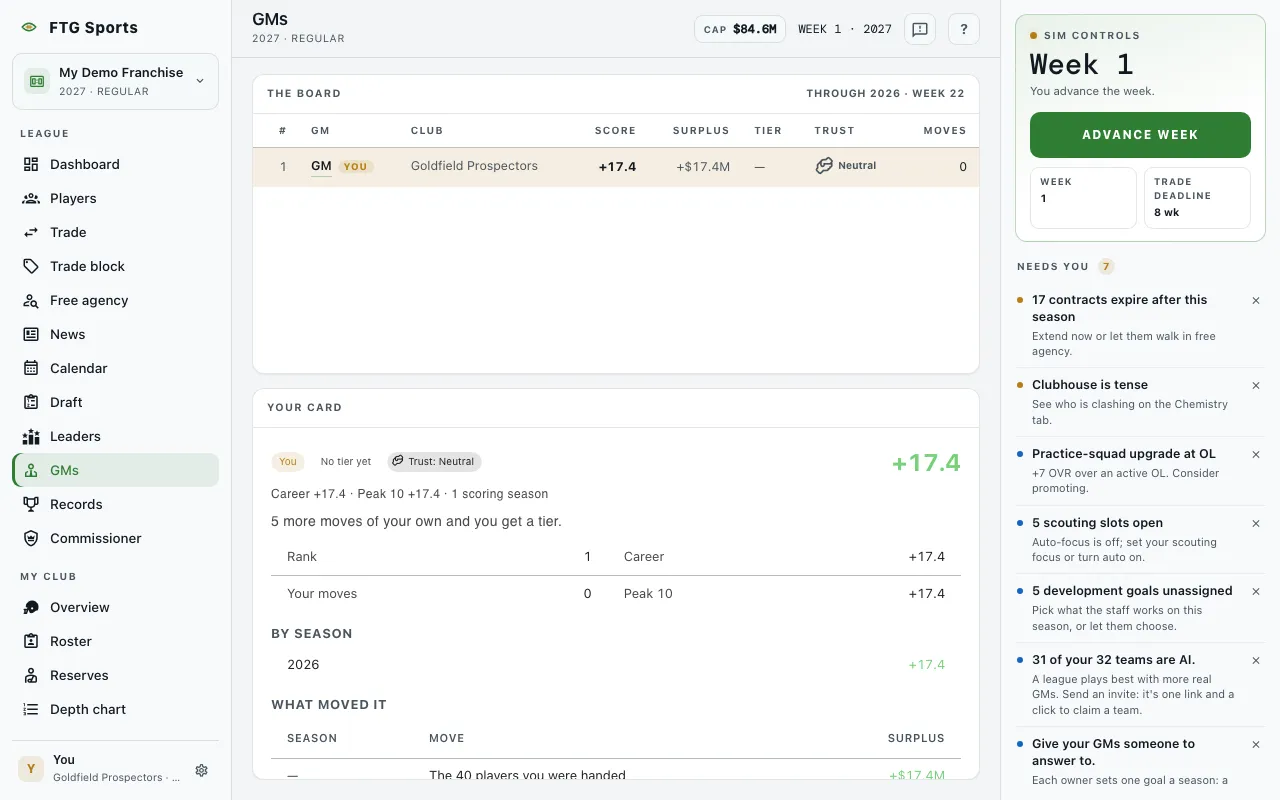
- The board pane: one row per GM. The header shows "Through" the season and week the scores cover, and shows "Catching up" when a recent move is not yet scored. The columns are:
- #: rank.
- GM: the GM's name. Your own row carries a You tag and a highlight.
- Club: the GM's team.
- Score: the GM score.
- Surplus: a dollar figure for value gained. This column appears only when money is shown in the league.
- Tier: the GM's tier, or a dash if none yet.
- Trust: the club's trust label.
- Goals: owner goals met. This column appears only when the league uses owner goals.
- Moves: how many moves were graded.
- Peak 10: a peak score. This column appears only when the league shows it.
- Your card pane: the same scoring applied to you. It shows only when you have a card or while it loads. If you have made too few moves of your own, it says "You have no card yet". Inheriting a roster does not count as a move. A spectator with no card sees the board alone.
- Before the first season closes, the board says "Nobody's been graded yet".
The game scores the league on its own at the end of every game week and offseason stage. There is no recompute button.
What you can do
- GM name: opens that GM's full card in a dialog.
- Club name: opens that team's page.
- Column headings: click a heading to sort the board.
- Retry: appears if the board fails to load.