Appearance
Depth chart
The Depth chart is where you choose who starts and who backs up at each position, and how snaps split between the two.
How to get here
- Open the My club group in the navigation.
- Select Depth chart.
What you see
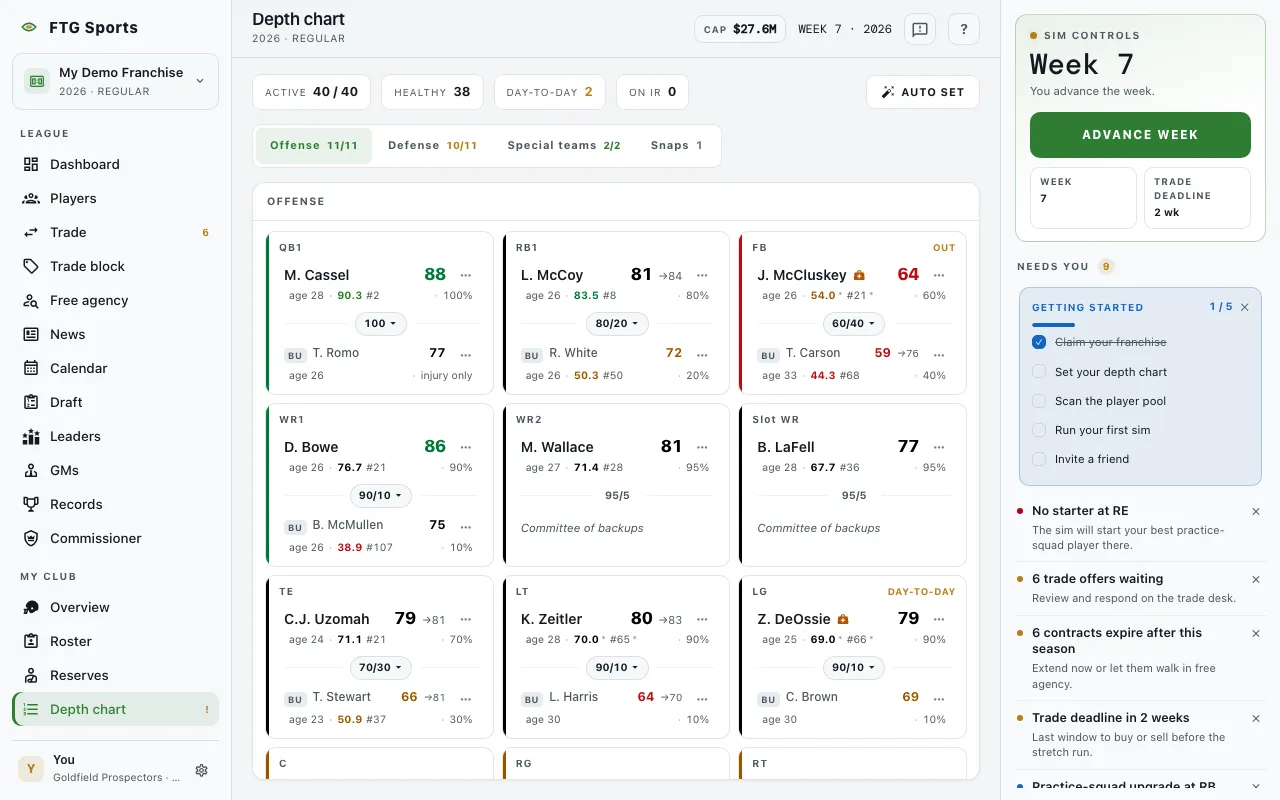
A strip of chips at the top: Active (against the 40 limit), Healthy, Day-to-day and On IR.
Below it are four tabs. Offense, Defense and Special teams each show a number beside the name: how many starters you have set. Snaps shows a count of active players who are on nobody's depth chart.
- Offense, Defense, Special teams: one card per slot. Special teams has two slots, K and P. Each card shows the starter on top and the backup below, with the player's overall rating and, when known, potential. A small line gives age, grade and the snap split. The split sits between the two players. An empty backup reads Committee of backups, which is normal. An empty starter cell reads No starter. When a starter leaves a slot, the backup moves up to starter. That holds when you move the starter, and when he goes to IR, goes to the practice squad or is traded away. The cell reads No starter only when the slot has nobody left.
- Snaps: two panes. Rotation lists each slot that has a starter and a backup, with the split between them. Playing time lists active players who are on nobody's two-deep, with a count of how many are unslotted. When every active player has a role, it says so.
If you do not manage the club, the screen shows Read-only club instead of the edit controls.
A starter slot with no healthy player is a gap. A gap puts a red badge on Depth chart in the left rail and a Depth chart has a gap row in Needs you. In a manual league the commissioner's Next sim card also shows Depth chart has a gap. Fix it first. and an Advance anyway button. The badge and the row stay until you fill the slot. See The sim controls.
What you can do
- Auto set: resets every slot to the top-rated active player at that spot.
- Drag a player onto another slot to swap. You can also tap one player, then tap the other.
- Player menu (the dots on a card): View player, Promote to starter or Swap with backup, a Move to list of other eligible slots, and Cut player. When you move a starter to another slot, his backup moves up to starter.
- Snap split control: between the two players on a card. Pick a split, or 100% for a starter with no rotation. The 100% option is offered only at QB, K and P. At other positions a starter takes at most 95/5. With no backup, the starter takes all the reps.
- Move to: on a Playing time row. Puts an unslotted player into an open or swapped slot, or lets you Send to practice squad.