Appearance
Box score
The box score is the full record of one game: the score, the drive log, player stats and the key drives.
How to get here
- Open the My club group in the left menu and select Schedule.
- Select the score of a finished game. The Box score chip next to it does the same on a wide screen.
You can also open a box score from the title game score on Champions and History. The top bar shows the matchup and a back arrow.
What you see
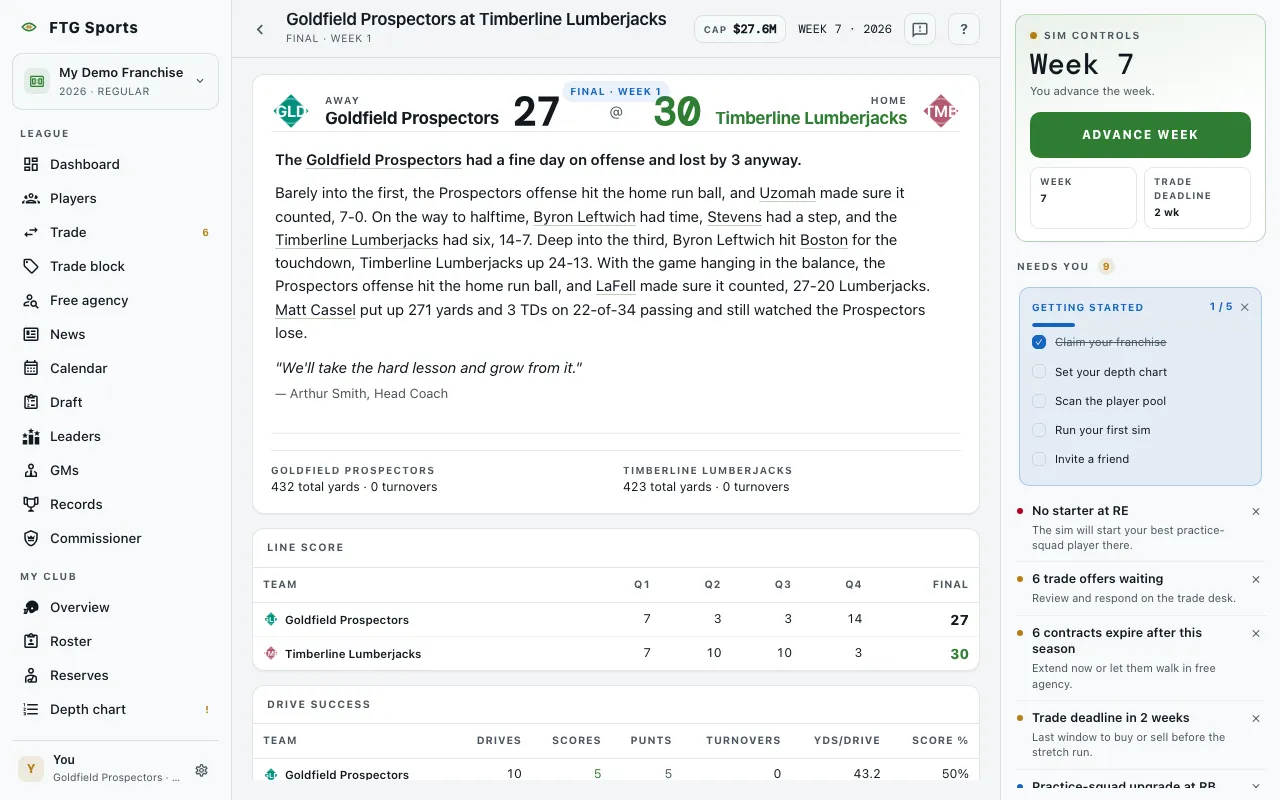 From top to bottom:
- Masthead: both clubs, marked Away and Home, with the score and a status such as "Final · Week N". Below it comes a game recap. If the game has no recap, you see a game ball line and a head coach quote when the game has them. The last lines give each club's total yards and turnovers.
- Line score: points by quarter for each club, then Final. An overtime adds an OT column.
- Drive success: for each club, Drives, Scores, Punts, Turnovers, Yds/Drive and Score %. On a phone the labels shorten to TO and Sc%.
- Drive log: one table for the whole game, with a break row at each quarter. The columns are #, Score (the score after the drive, with a mark where the lead changed), Team, Start, Field (a drawn bar of where the drive went), Result, Plays, Yds and TOP. The result is one of TD, FG, Punt, Turnover on downs, Interception, Fumble, Missed FG, End of half, End of game or Safety.
- Player stats: sections for Passing, Rushing, Receiving, Defense, Kicking and Punting. A section shows only when a player has a stat in it. Rows open in best-first order. A team with no stats says No recorded stats for this team.
- Key drives: one line for each drive that produced a notable play, with the quarter, the clock, the yards and the score after a scoring drive.
If the game cannot load, you see "We couldn't find this game.", "You don't have access to this game." or "We couldn't load this box score." with a Retry button.
What you can do
- Sort (Drive log): choose Game order, Yards, high to low or Possession, longest first. Quarter breaks show only in game order.
- Caret next to a result: shows or hides the key plays from that drive. It appears only on drives that have key plays.
- Away and home buttons (Player stats): switch between the two clubs.
- Column headers (Player stats): select one to sort that section.
- Player and club names: open the player page or the club page.