Appearance
Chemistry
Chemistry shows the locker-room mood of your club: how the room feels, who shapes it, and what has moved player moods lately.
How to get here
- Open the left rail and find the My club group.
- Click Chemistry.
On another club's page you see only the Locker room pane. The detailed panes belong to the club's own GM.
What you see
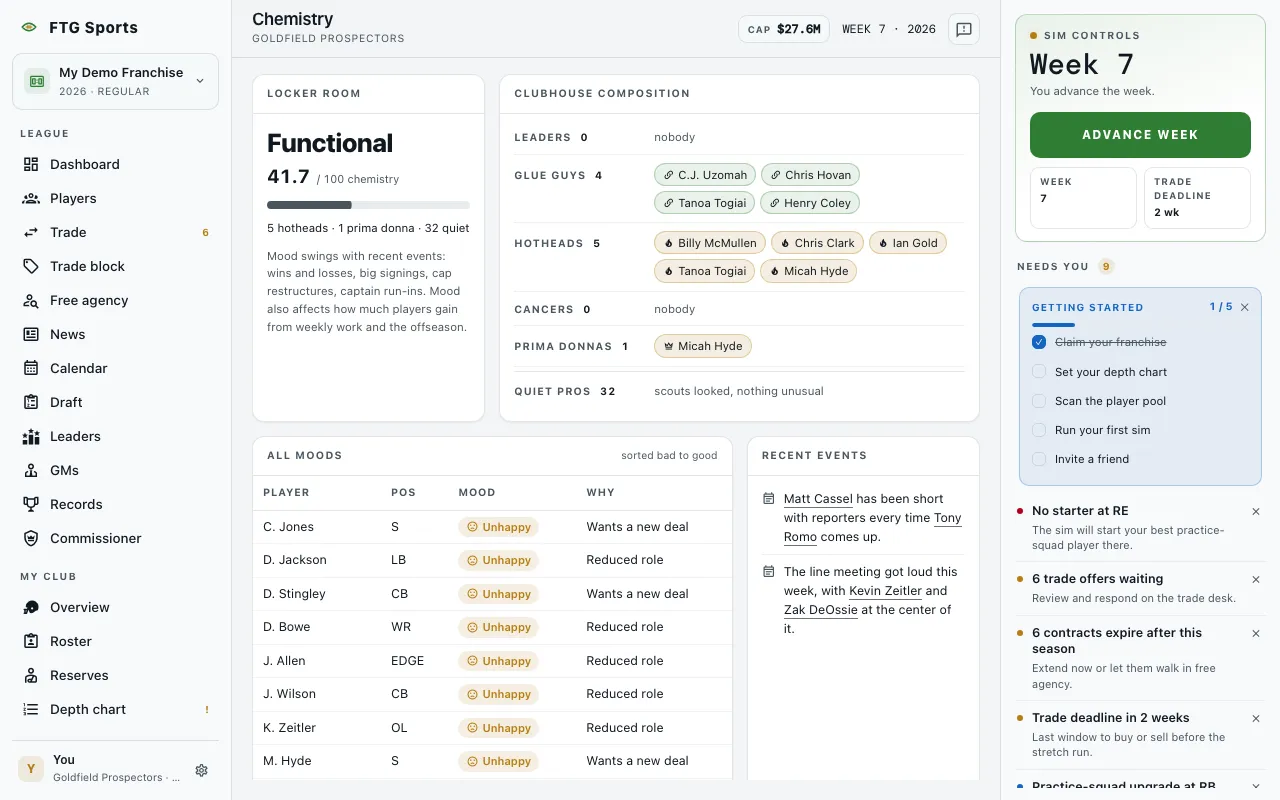
- Locker room: a one-word verdict (the colors run from Toxic and Tense to Healthy and Locked-in), a score out of 100 with a bar, and a summary line such as "2 leaders · 1 hothead · 40 quiet". A note explains that mood swings with wins and losses, big signings, cap restructures and captain run-ins, and that mood affects how much players gain from weekly work and the offseason.
- Clubhouse composition: players grouped as Leaders, Glue guys, Hotheads, Cancers and Prima donnas, each with a count and a chip for every player. Quiet pros counts the players your scouts looked at and found nothing unusual.
- All moods: a table with Player, Pos, Mood and Why. Moods run Furious, Unhappy, Neutral, Content, Thrilled. The table starts sorted from bad to good. On a fresh league it says The whole room is on an even keel.
- Recent events: a list of recent locker-room items. When it is empty it says Quiet week in the building.
What you can do
- Click a column heading in All moods: sorts the table by that column. Mood sorts by severity, not by letter.
- Click a player name or chip: opens that player's page.