Appearance
Dashboard
The Dashboard is the home screen of a league. It shows how your team is doing, the standings, the week's games, and what comes next.
How to get here
- Open a league from My leagues.
- In the left rail, under League, select Dashboard. A league opens here by default.
What you see
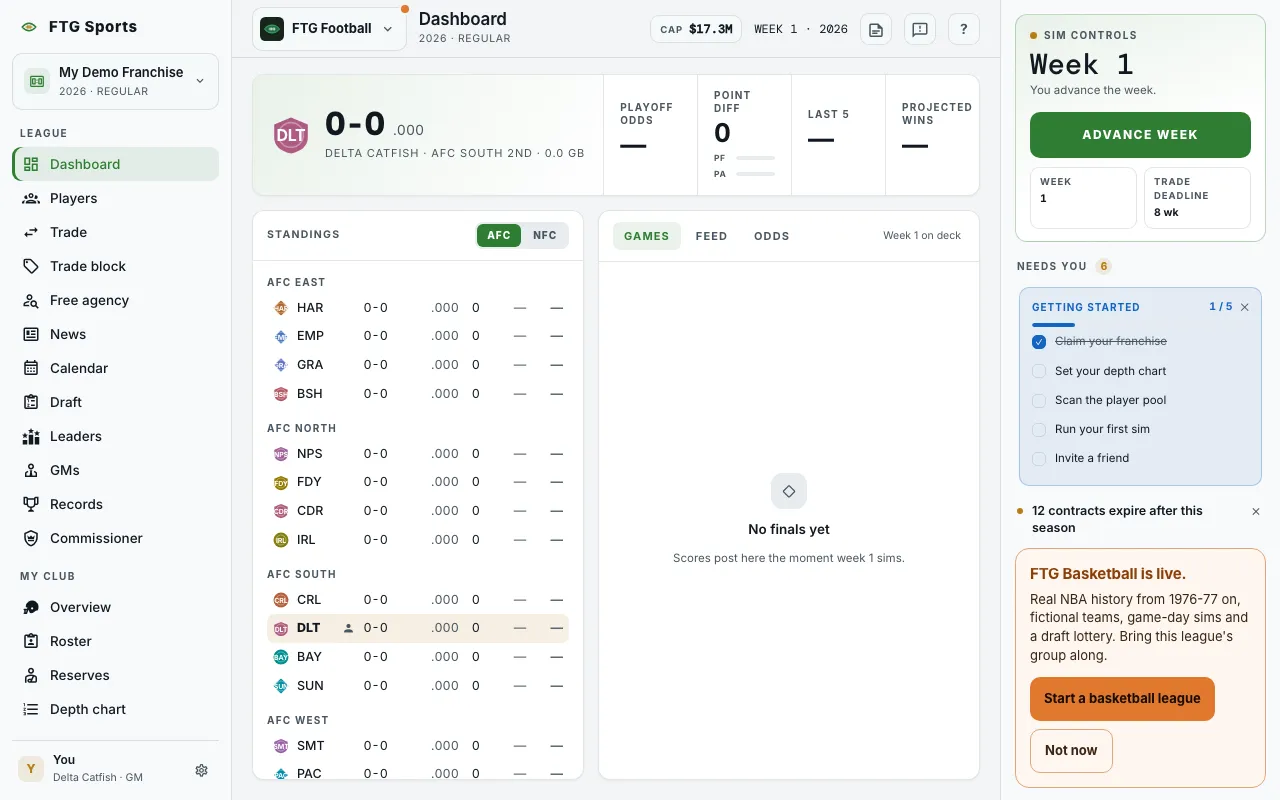 The screen changes with the phase of the season. A strip across the top always shows.
- FTG Basketball is live. card, on the right on a wide screen or at the top of the screen on a smaller one, until you hide it.
- Your owner fired you: shows only after your owner fires you in a league set to Find a new club. It names the season and lists each Open club. You still run your old club until you choose. When every club has a GM, it says so, and you keep your club until one opens up.
- Hero strip: your record with a win percentage, then four cells: Playoff odds, Point diff (bars for PF and PA), Last 5, and Projected wins.
During the regular season:
- Standings: with Coastal and Heartland buttons to switch conference. Before the first week is simmed it reads "No standings yet".
- Games: a tab with each game of the week. Select a game to open its box score. Before week 1 it reads "No finals yet".
- Feed: a tab of league news, latest first. Before the season plays it reads "Nothing on the wire yet".
- Odds: a tab with playoff odds. It reads "Odds open after week 1" until one week has been played.
During the playoffs:
- Bracket: the current round, with each series. It reads "No bracket yet" until the field is set.
- A pane with a Feed tab and a Standings tab. Feed is the default.
During the offseason:
- Offseason: a list of 10 steps, from Honors and retirements through Schedule release. Each step shows whether it is done, current, or still to come. A tag at the top reads Waiting on you when the league needs your decision.
- Final standings: the league-wide table from the season just played.
After you advance, a short Dismiss-able recap card shows the week's results and fades by itself.
What you can do
- Coastal and Heartland: switch the conference shown in Standings.
- Games, Feed and Odds: switch the right-hand pane.
- A game row: opens its box score.
- Advance week: plays the week. It sits on the Next sim card in the panel on the right, not on this screen, and reads Next step in the offseason. The arrow beside it opens Sim to…. Look at Needs you under the card for what needs doing first. Only the commissioner can advance a league on manual pace. See The sim controls.
- An offseason step: when a step needs you (for example the contract window, free agency or the draft), select the highlighted step to jump to that screen.
- Dismiss: closes the recap card.
- Take over on the Your owner fired you card: opens a confirm. Select Take over again to run that club from now on. Your old club goes to the AI, and you cannot take this back.
- Start a basketball league on the FTG Basketball is live. card: opens FTG Basketball.
- Not now on the same card: hides it for 30 days. The game switcher still lists FTG Basketball.
- ? help note: "Run your season" in the regular season, "It's the postseason" in the playoffs, "Time to rebuild" in the offseason.