Appearance
Roster
The Roster is where you move players on and off your active list. It is the working ledger for your 40 active players.
How to get here
- Open the My club group in the navigation.
- Select Roster.
What you see
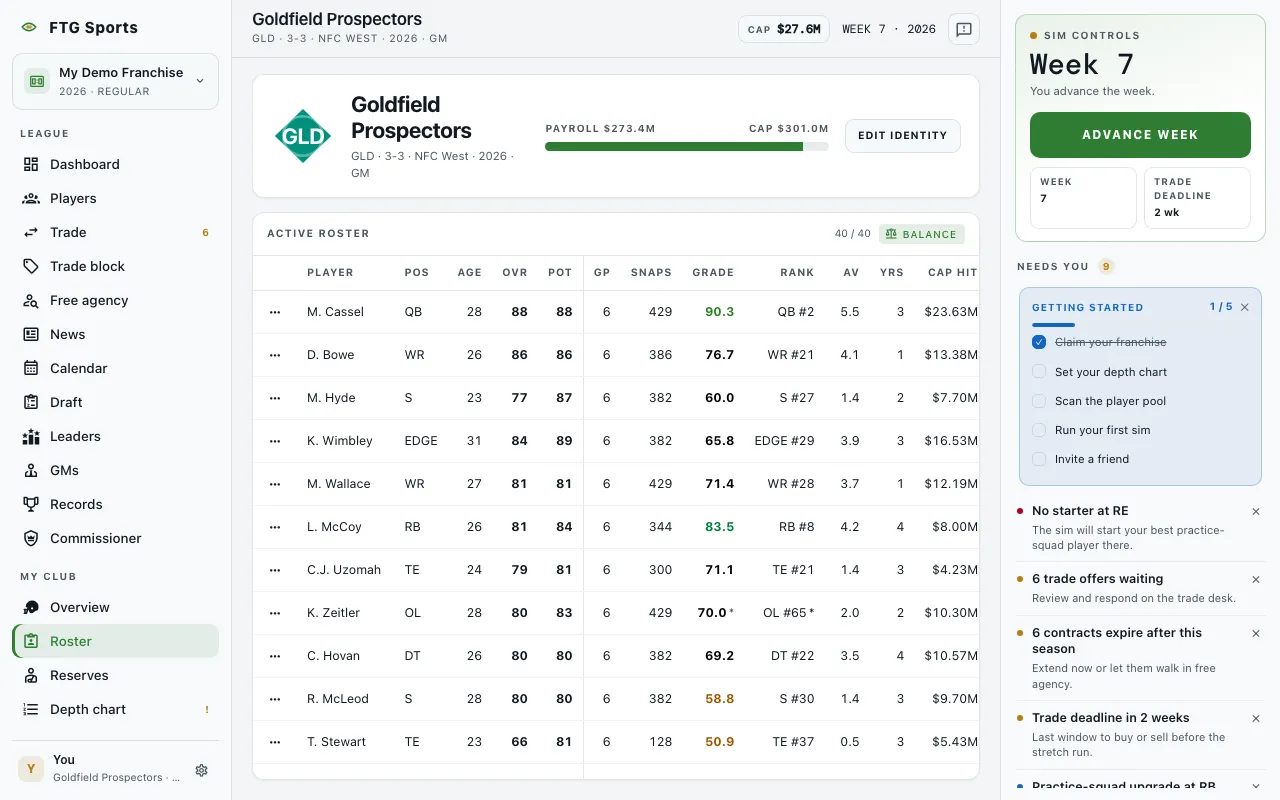
One pane, Active roster. Its header shows how many players you carry against your limit, for example 40 / 40. The limit is 40 during the season and 53 in the offseason. The count turns to a warning color when you are over.
The table has one row per active player. Click a column title to sort by it. The columns are:
- Player and Pos.
- Age.
- OVR: current overall rating.
- Pot: potential, the scouted ceiling.
- GP: games played this season.
- Snaps: snaps this season.
- Production: a short stat line that changes with the position. You cannot sort it.
- Grade: production grade, 0 to 100, where 60 is average, graded against players at the same position.
- Rank: rank within the position, league-wide.
- AV: Approximate Value, the season value across all positions.
- Yrs: contract years remaining.
- Cap hit and Cut saves: shown only when money is on in your league.
A star after a grade or rank means the number is an estimate. On a phone every column stays: the player's name is pinned on the left and the rest of the table scrolls sideways.
What you can do
- Row menu (the dots at the start of each row): opens the actions for that player.
- View player: opens the player page.
- Send to practice squad: moves the player off the active roster.
- Cut player: releases the player. The game asks you to confirm.
- Balance: appears if you manage the club. It previews a set of moves that covers every position and keeps you within the limit. The preview lists players to promote from the practice squad and players to demote, and warns when a move Breaks promise. Choose Apply moves to accept, or Cancel to leave the roster alone.