Appearance
Players
The Players screen lists every player in the league: rostered players on all 32 teams and the free agents. Use it to scout, compare, and find who to trade for or sign.
How to get here
- Open a league.
- In the left rail, under League, select Players.
What you see
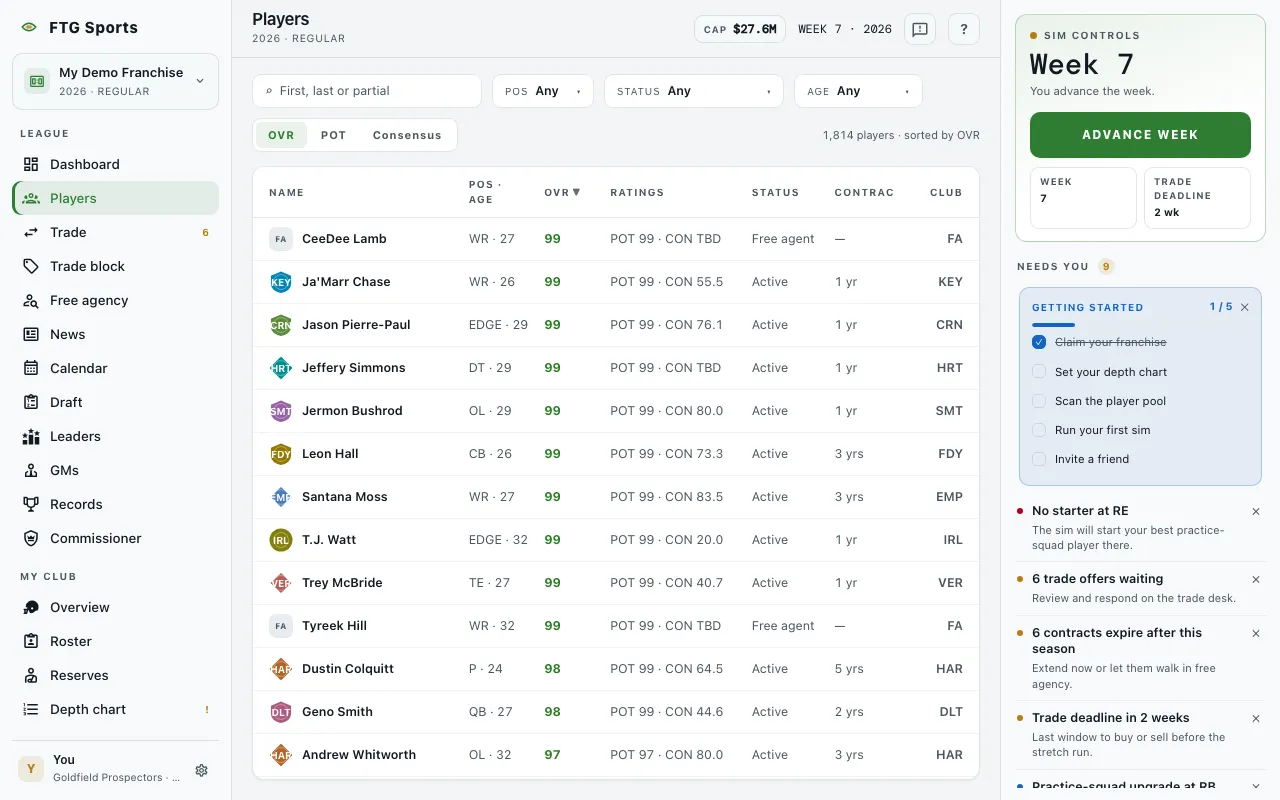
- Search players box at the top left. The hint reads "First, last or partial".
- Filter row: Pos, Status, and Age drop-downs, and a Rate players by switch with OVR, POT and Consensus. On a phone these sit behind one Filters button that shows a count of active filters.
- Count on the right, such as "120 of 1,900 players", plus the current sort.
- The table, with these columns: Name (a team crest or an FA tile, then the player's name), Pos · Age, the rating you chose (OVR, POT or Consensus), Ratings (the other two ratings), Status, Contract (years left, or a dash for a free agent), and Club. Your own team's rows are highlighted.
- Scouting card: opens on the right when you select a row. The header shows the crest (or FA), the player's name, and a line such as "QB · Age 27 · (club) · Active". Tiles follow: OVR, POT, Consensus, Age, Years left and a "(position) rank" tile. Under Tools are the player's attribute ratings with bars, or "No tool grades on file." These are the same scouts' read that the Player page shows, not exact values. Below that, labelled rows can appear: Health (for example "Day to day", with a return week), Contract, Drafted or College, and Production ("Not enough snaps yet for a grade."). If the card cannot load, it says "The scouting card didn't load. The numbers above are current." At the bottom are the Full profile button and Offer or Add to trade.
- A note at the bottom of a long list: "Showing the top 500 of ...". Search or filter to reach the rest.
- Nobody matches those filters when the filters hide everyone. The player pool didn't load shows with a retry button if the load fails.
The Pos list runs QB, RB, FB, WR, TE, OL, EDGE, DT, LB, CB, S, K, P. The Status list has Active, Free agent, IR and Practice squad. The Age list has Under 24, 24 to 27, 28 to 31 and 32 and up.
What you can do
- Search players: type part of a name to narrow the list.
- Pos, Status, Age: filter the list. Any clears one filter.
- OVR, POT and Consensus: choose which rating the table shows and sorts by. The other two move into the Ratings column.
- Column headers: select one to sort by it. Select it again to reverse the order.
- A player row: opens the scouting card. ✕ closes it. Its buttons are Full profile, and either Add to trade (for a rostered player) or Offer (for a free agent). Offer is off in the offseason, because the open market is closed then. The first button needs a team of your own.
- A player name: opens that player's Player page.
- A team crest: opens that team.
- Clear filters: resets every filter. On a phone it is Clear inside the Filters sheet.