Appearance
Leaders
This screen ranks players by season statistics, one category at a time. Use it to see who leads the league and how your players compare.
How to get here
- In the left rail, find the League group.
- Click Leaders.
What you see
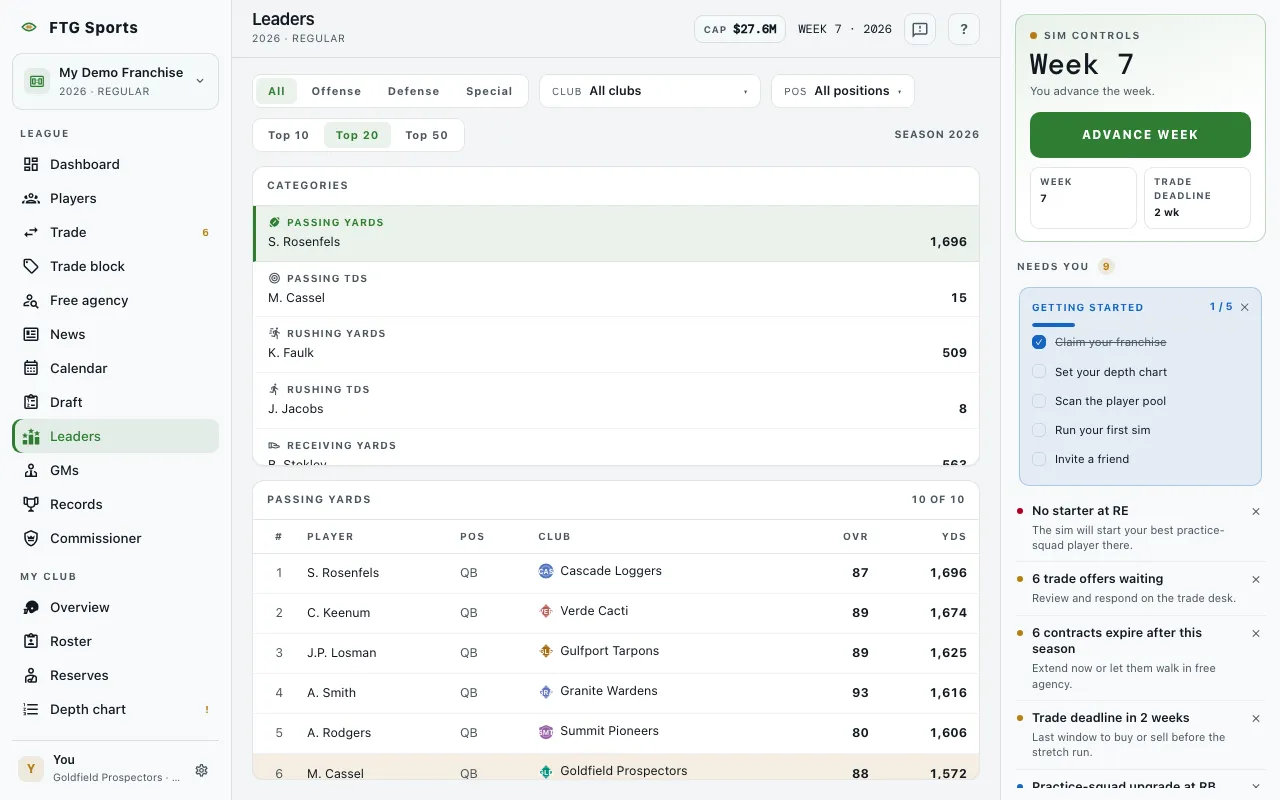
- Filter row at the top: All, Offense, Defense and Special buttons, a Club menu, a Pos menu, and Top 10, Top 20 and Top 50 buttons. The current season shows as "Season" with its year. On a phone, the Club, Pos and Top buttons sit behind a Filters button that shows a count of active filters.
- Categories pane: one row per statistic with its current leader and value. The categories are Passing yards, Passing TDs, Rushing yards, Rushing TDs, Receiving yards, Receiving TDs, Sacks, Interceptions, Tackles, Forced fumbles, Field goals and Punt average. A category with no leader reads "No qualifiers". Before the league plays a week, the pane says "No leaderboards yet".
- Board pane, titled with the chosen category: a table with #, Player, the statistic itself, Pos, Club and OVR. Your own team's players are highlighted. A player with no club shows FA. The header shows a count such as "10 of 48".
Every board ranks most first.
What you can do
- A category row: switches the board to that statistic.
- All, Offense, Defense and Special: limit the categories to one side of the ball.
- Club and Pos: narrow both panes to one team or one position.
- Top 10, Top 20 and Top 50: set how many rows the board shows.
- Column headings: click a heading to sort the board.
- Player name: opens the player's page. In Categories, the leader's name opens it too.
- Club name: opens that team's page.
- Clear filters: appears when filters leave the board empty.
- Retry: appears if the boards fail to load.