Appearance
Scouting
Scouting is your draft board. You compare what the league thinks of each prospect with what your own scouts think, and you choose which prospects your scouts spend their time on.
How to get here
- Open the left rail and find the My club group.
- Click Scouting. A badge on the item shows your open focus slots.
Only the GM of the club sees the board. On another club's page, the screen says This board is private.
What you see
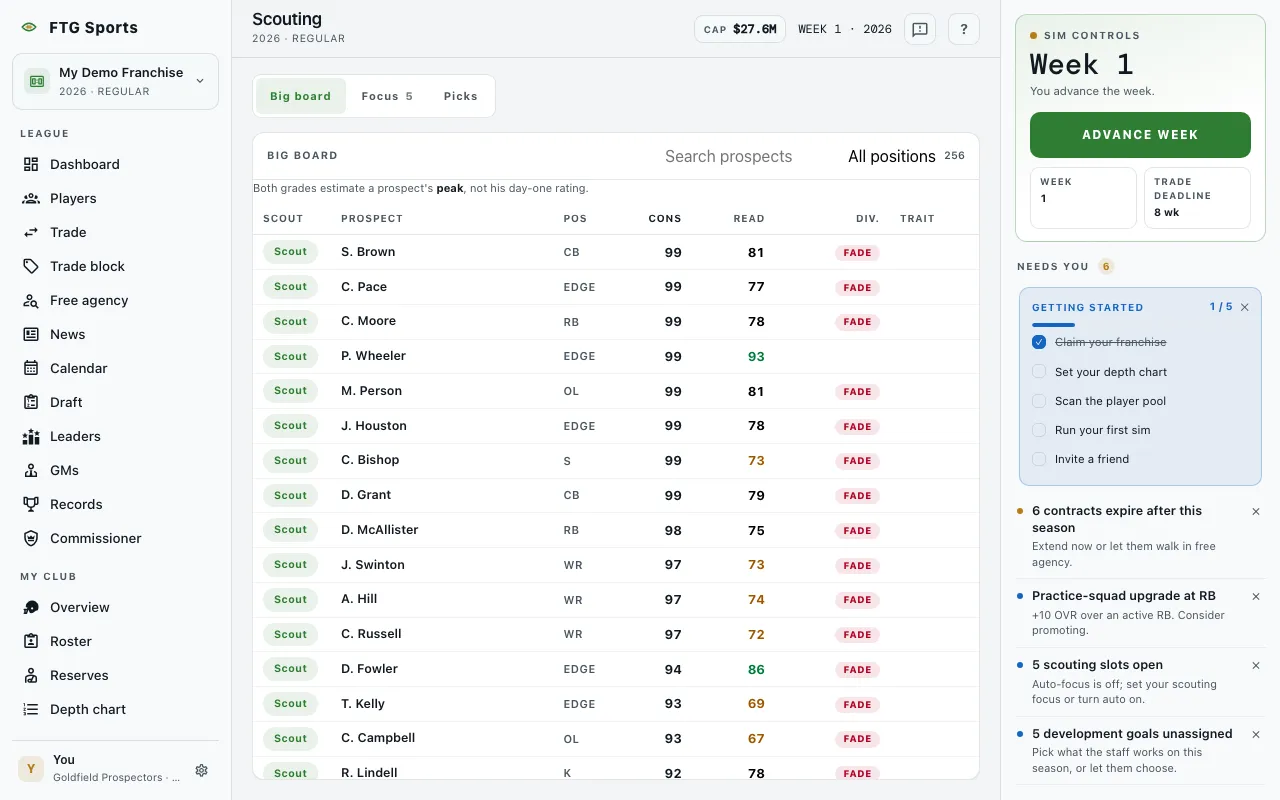 A tab strip at the top switches between three panes: Big board, Focus (with a count of open slots) and Picks.
- Big board: a table of the draft class. A note above it says both grades estimate a prospect's peak, not the rating on day one. Columns are Scout, a rank number, Prospect, Pos, College, Consensus ceiling, Your ceiling read, Div. and Trait. On narrow windows some columns are dropped and the headers shorten to Cons and Read. Div. shows Steal when your scouts rate a prospect above the room and Fade when they rate the prospect below. Trait shows a trait once your scouts uncover it. A progress bar under a name shows scouting progress.
- Focus list: your five scouting slots, numbered 1 to 5, with the count of slots used. Each full slot shows the prospect, the position, and "auto" when auto-focus filled it. An empty slot reads "Empty. Scout someone from the board."
- Your picks: the draft picks your club holds, shown as overall number, round and pick in the round. A pick you got by trade shows "via" and the original club. The pane header shows the season and the number of teams.
What you can do
- Search prospects box: filters the board by name.
- All positions menu: filters the board by position.
- Column headings: click to sort the board.
- Note mark beside a prospect's name: opens your private note on him under his row. The mark is filled when you wrote one. The note is deleted when he is drafted. See My notes.
- Scout: puts the prospect in a free focus slot. It is disabled when all five slots are full.
- Stop: takes a prospect out of focus. When auto-focus is on, this control reads Auto and is disabled.
- Full: a chip that replaces the button when a prospect has nothing left to uncover.
- Auto checkbox (Focus list): turns auto-focus on or off. With auto-focus on, empty slots fill at the next weekly reveal, aimed at the widest gaps between your scouts and the room.
- ✕ on a slot: stops scouting that prospect. It is hidden while auto-focus is on.
- Unknown, recheck: appears if the game could not read your auto-focus setting. Click it to read the setting again.
- Full order (Picks): opens the full draft order.
- Click a prospect name to open the Prospect page.