Appearance
Stats
Stats shows your club's season totals and where each one ranks among the 32 teams in the league. Read the rank column first, because a total means little without its rank.
How to get here
- Open the left rail and find the My club group.
- Click Stats.
What you see
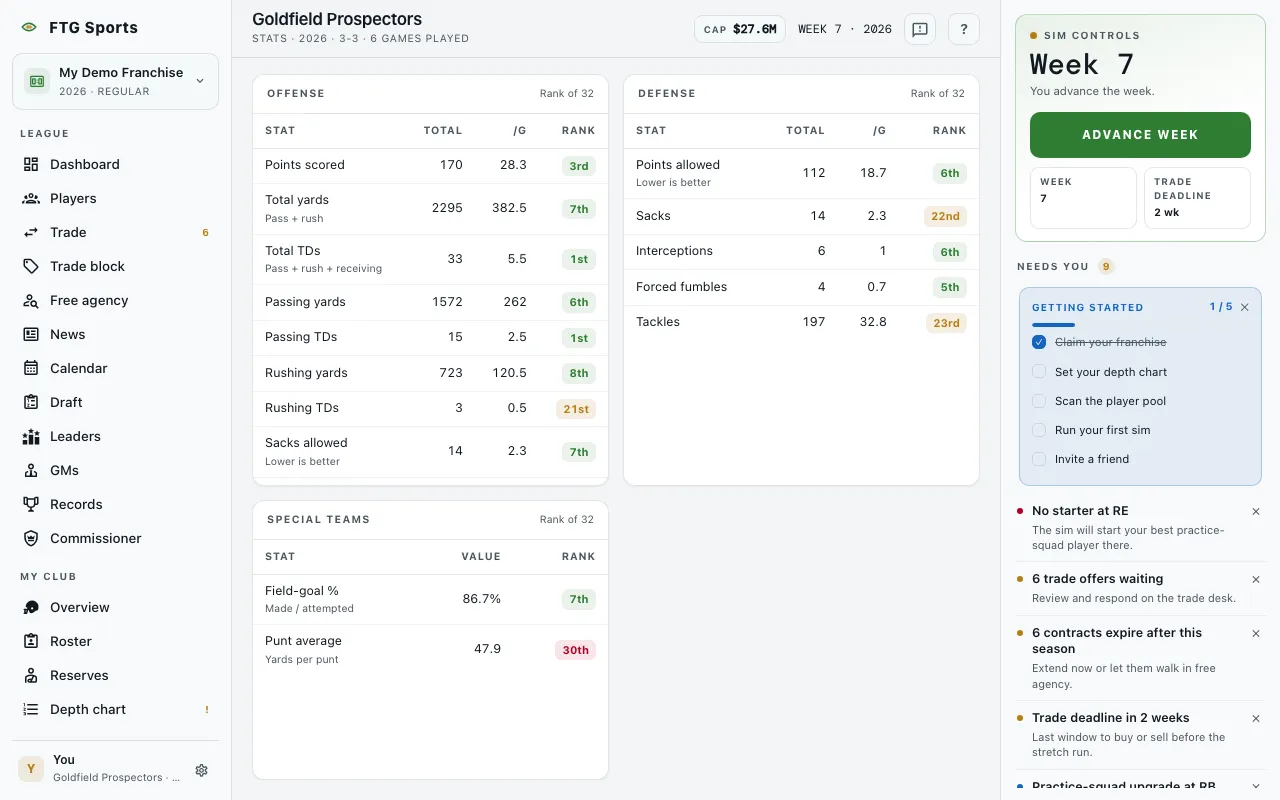 The top bar shows your club name, the season, your record and games played. Three panes sit side by side, each labelled Rank of 32.
- Offense: Points scored, Total yards, Total TDs, Passing yards, Passing TDs, Rushing yards, Rushing TDs, Sacks allowed and Turnovers lost. Each row has Total, /G (per game) and Rank.
- Defense: Points allowed, Sacks, Interceptions, Forced fumbles and Tackles, with the same three columns.
- Special teams: Field-goal % and Punt average, with Value and Rank columns.
Small hints sit under some stat names, such as "Lower is better" under Sacks allowed and Points allowed. Rank colors follow the table: ranks 1 to 8 are green, 9 to 16 are neutral, 17 to 24 are amber and 25 and below are red. A dash means the league has no rank for that stat yet. Before your club plays a game, one pane says No games in the books yet.
What you can do
- Season menu: switches to an earlier season. It appears once the club has two or more seasons of stats. The chosen season is saved in the page address, so a shared link opens the same season.
- Click a column heading (Stat, Total, /G, Rank): sorts that pane. Each pane sorts on its own.