Appearance
Coaching moves
This screen lists every coach who lost a job this season and every coach who took one. Use it to catch up on the coaching changes across the league.
How to get here
- In the left rail, find the News item in the League group.
- Open News. Coaching moves appears under it.
- Click Coaching moves.
What you see
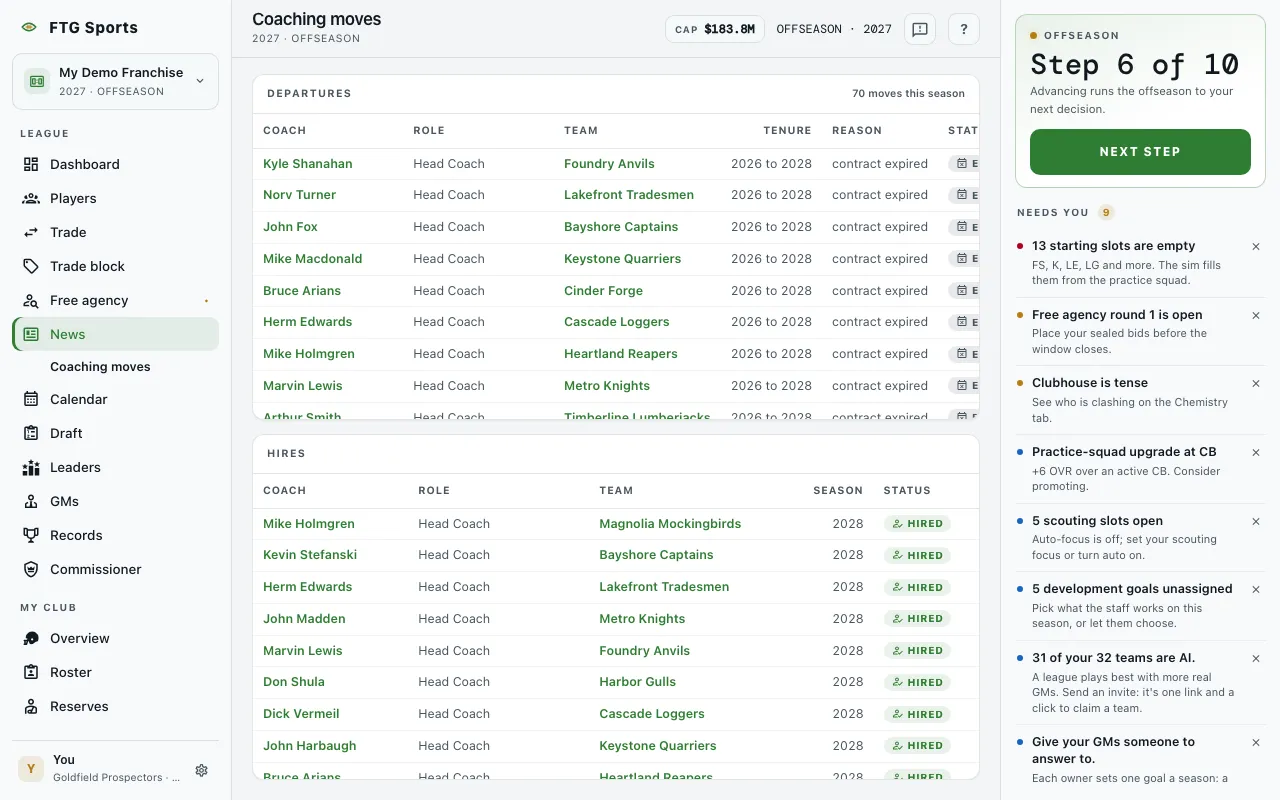
- Departures pane: a table of coaches who left a job. A count such as "3 moves this season" sits in the pane header. The columns are Coach, Role, Team, Tenure, Reason and Status. Role is Head Coach, Offensive Coordinator or Defensive Coordinator. Tenure shows the span of seasons, for example "2024 to 2026". Status reads Fired, or Expired when a contract simply ran out.
- Hires pane: a table of coaches who took a job. The columns are Coach, Role, Team, Season and Status. Status reads Hired.
- If nobody has left yet, Departures says "No coach has left a job yet". If nobody has been hired, Hires says "No new staff yet".
What you can do
- Coach name: opens that coach's Coach profile.
- Team name: opens that team's page. A dash appears when a coach has no team.
- Column headings: click a heading to sort that table. Each table sorts on its own. Status cannot be sorted. Role sorts by rank: Head Coach, then Offensive Coordinator, then Defensive Coordinator.
- Retry: appears if the list fails to load.