Appearance
Prospect
The Prospect page is the dossier on one draft prospect. It puts your scouts' private read next to the league's grade and shows how much of the prospect's talent profile you have uncovered.
How to get here
- Open the left rail, find the My club group, and click Scouting.
- Click a prospect's name on the Big board or in the Focus list.
What you see
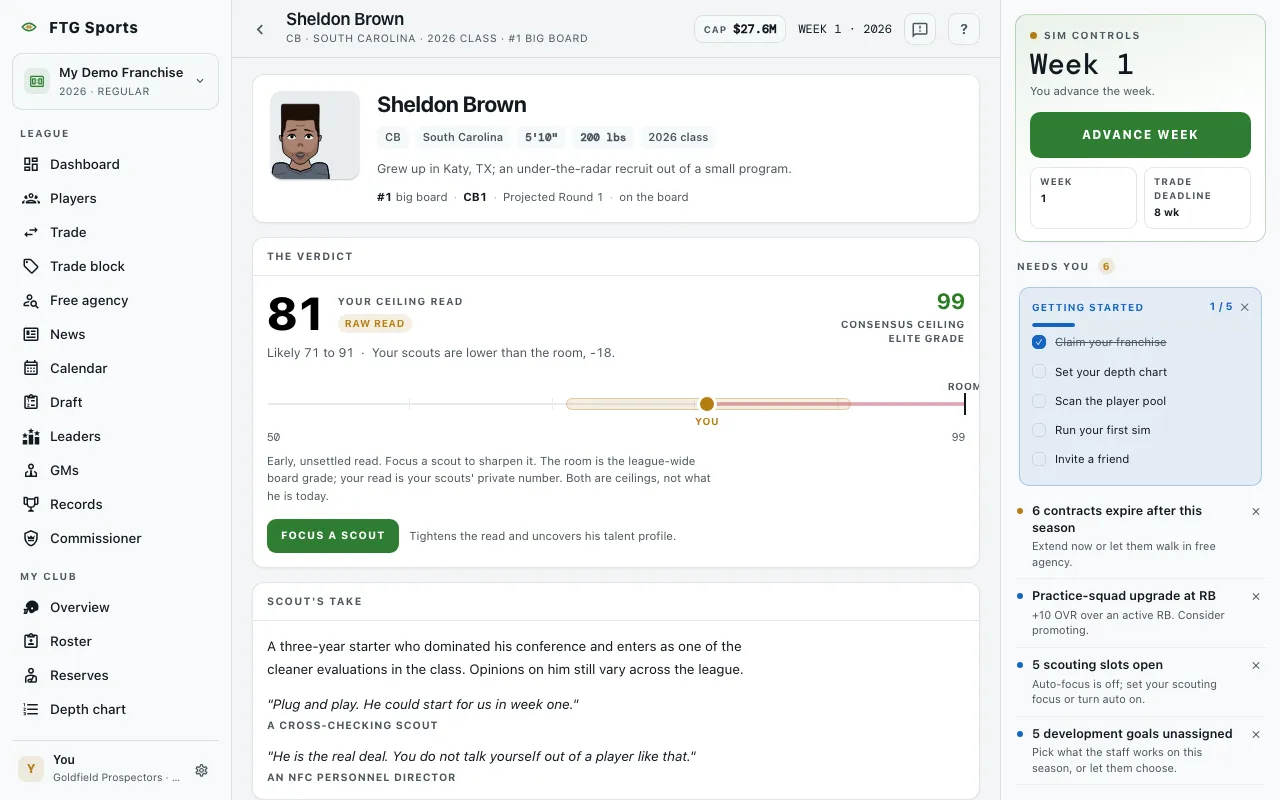
- Identity block: the face, name, position, college, height, weight and draft class year. A Withdrawn tag appears if the prospect has left the draft. A strip shows the prospect's place on the big board, the rank at the position, and either "on the board" or the week his grade reveals.
- The verdict: a large number labelled Your ceiling read, with a confidence tag and a range. Beside it sits the Consensus ceiling and its grade label. A bar on a 50 to 99 scale marks You and Room. If your scouts have no read yet, it says "No read yet. Focus a scout to form one." Both numbers are ceilings: they estimate what the prospect can become, not what the prospect is today.
- Scout's take: a college note and short scouting quotes with their sources.
- Talent profile: trait cards for rare special traits, then a list of talent facets. Each facet shows a tier. Some carry a Hidden gem or Red flag tag. Facets you have not uncovered show as Scouting in progress with "Focus to uncover". The pane header counts how many remain, or says Fully uncovered.
What you can do
- Focus a scout: puts the prospect in one of your five focus slots. It tightens your read and uncovers his talent profile.
- Stop scouting: removes the prospect from focus. It is disabled while auto-focus is on; turn auto-focus off on the Scouting screen first.
- Check again: appears if the game could not read your auto-focus setting. Click it to read the setting again.
- Focus list full: a disabled button that shows when all five slots are taken. Free a slot on the Scouting screen first.