Appearance
Draft order
This screen lists every pick in the draft, one round at a time. Use it to see when you pick, who owns each pick, and who each team is likely to take.
How to get here
- Open Draft from the League group in the left rail.
- In the Pick feed pane, click Full order.
The Draft item in the rail stays highlighted while you are on this screen. The order exists all season, so you can read the projected order well before the draft.
What you see
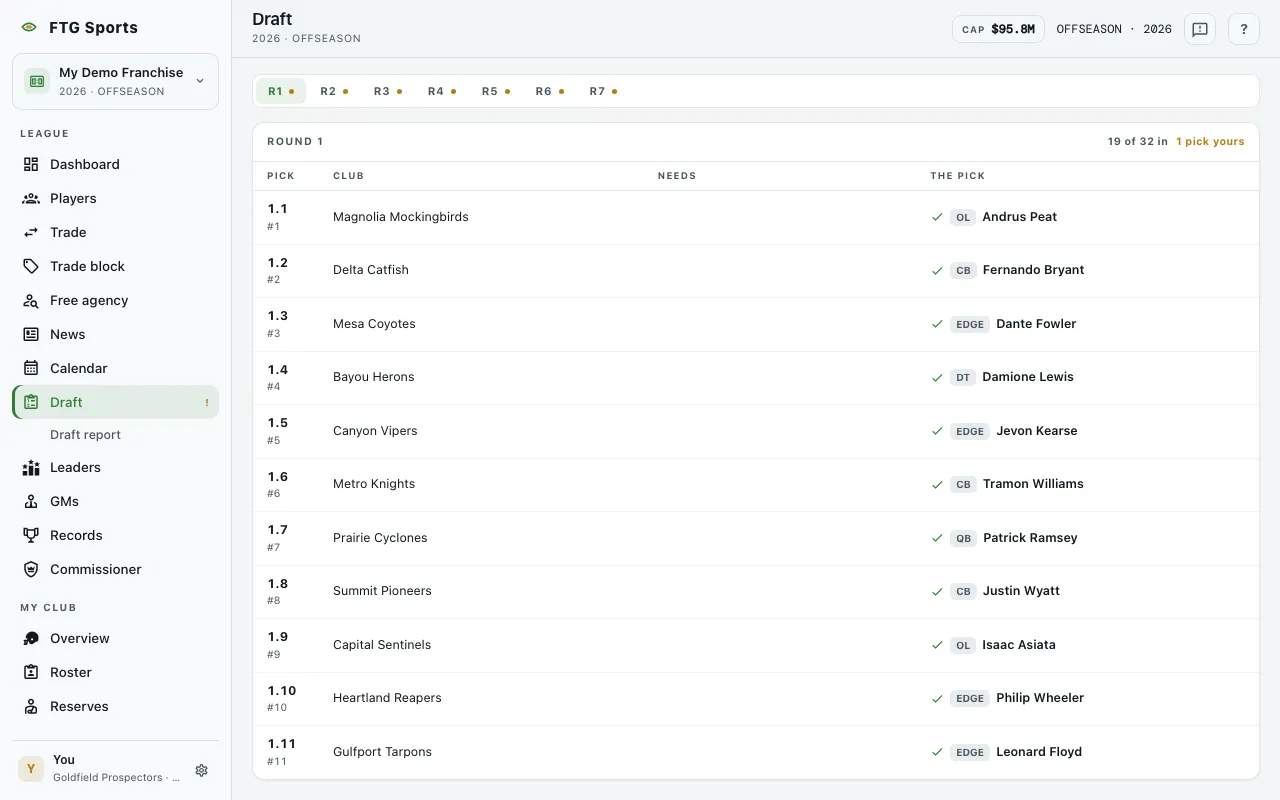
- Round tabs across the top: R1, R2 and so on. A mark on a tab means you own a pick in that round.
- A pane titled with the round, for example Round 1. The header shows how many picks are in, such as "12 of 32 in", and how many are yours, such as "2 picks yours". Your own picks are highlighted.
- A table with four columns:
- Pick: the round and pick in the round, with the overall number beside it, for example "1.5" and "#5".
- Club: the team that owns the pick. A traded pick adds "via" and the original team.
- Needs: the positions that team needs most. This stays empty once the pick is made.
- The pick: for a made pick, a check mark, the position and the player taken. For a pick still to come, a Proj tag, the position and the projected prospect. If the prospect pool is empty, the cell shows the position and "pool exhausted".
- Before the next class is drawn, the pane says "No draft order yet".
What you can do
- R1, R2, ...: switch to another round.
- Club and via names: click a team name to open its page.
- Projected prospect name: opens the prospect's page when you have a team. Without a team, it is plain text.
- Retry: appears if the order fails to load.
The screen is read-only. You make all picks in Draft.