Appearance
Trade
Trade is where you build a deal with another club and send it. It also holds the offers other managers send you.
How to get here
- Open your league.
- Select Trade under the League group in the navigation. The item can carry a badge.
What you see
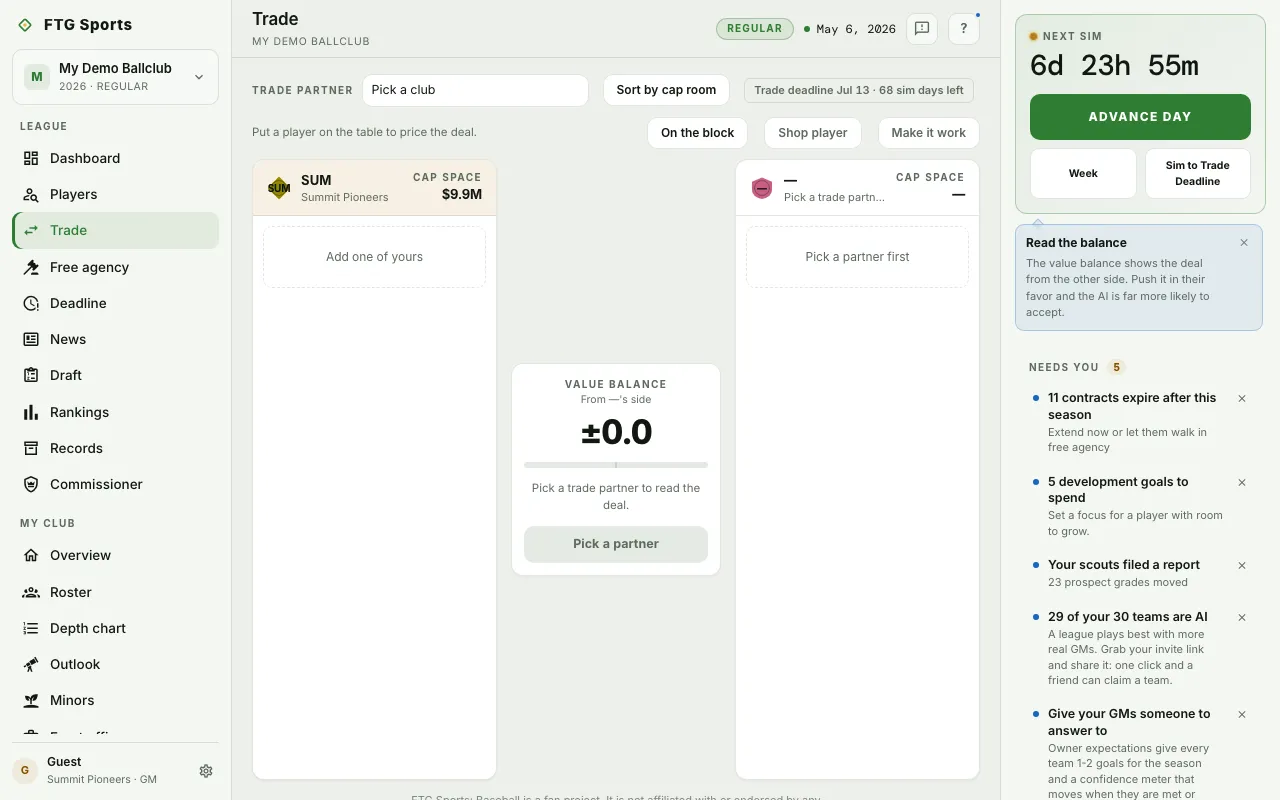
- Offers on your desk, at the top. It lists pending offers sent to you. It stays hidden when you have none.
- Recently resolved, folded away under it. It lists offers that ended in the last 7 days: expired, voided, rejected, withdrawn, vetoed or accepted. It stays hidden when empty.
- Trade partner list, with the first choice Pick a club. Each club shows its cap room.
- Trade deadline chip. It reads "Trade deadline" with the date and the sim days left, or "Trade deadline has passed".
- Warning line when the window is shut. In the playoffs it reads "Rosters are locked for the playoffs. Trading reopens in the offseason." After the deadline it reads "The trade deadline has passed. Offers reopen in the offseason."
- Your side strip, once a player is on the table. It shows Cap, Age and sWAR (YTD), each as incoming minus outgoing, from your side. Before that it says "Put a player on the table to price the deal."
- Trade board, two panes with the clubs side by side. Each shows its cap space, or Cap after deal once players are on the table. Each has a button that reads "Add one of yours" on your side and "Pick a partner first" until you choose a club.
- Value balance card between the panes. It reads "From" the partner's side, with a bar and a short read of the deal.
What you can do
- Pick a club: choose your trade partner.
- Sort by cap room: lists the clubs with the most cap room first. It then reads Most room first. Select it again to return to league order.
- Add a player: select the dashed button on either side to open a roster picker. Select a player there to add or remove that player.
- Remove a player: use the remove button on the player's card.
- On the block: opens the list of players clubs have put up for trade.
- Shop player: select exactly one of your players first. Every AI club then offers its best package for that player.
- Make it work: asks an AI front office what addition would close the deal. It is off when the window is closed.
- Send offer: sends the deal. The button reads Send to and the club's abbreviation once a partner is set. It reads Rosters locked in the playoffs, Deadline passed after the deadline, and No-trade clause when a player on the table has one.
- Accept and Reject: answer an offer sent to you, from Offers on your desk.
- Counter: opens the trade board with that club and the players from the offer already set up.
- Withdraw: takes back an offer you sent.
- Pending offers: clear them before you send a new one.