Appearance
Roster
Roster lists every hitter and pitcher in your organization in two tables. Use it to sort your players, move them between the Majors and the Minors, offer an extension, or release a player.
How to get here
- Open your league.
- In the left rail, under My club, click Roster.
Roster is not a separate page. It is the Roster tab of Overview. You can also click Overview in the rail, then the Roster tab at the top of the page.
What you see
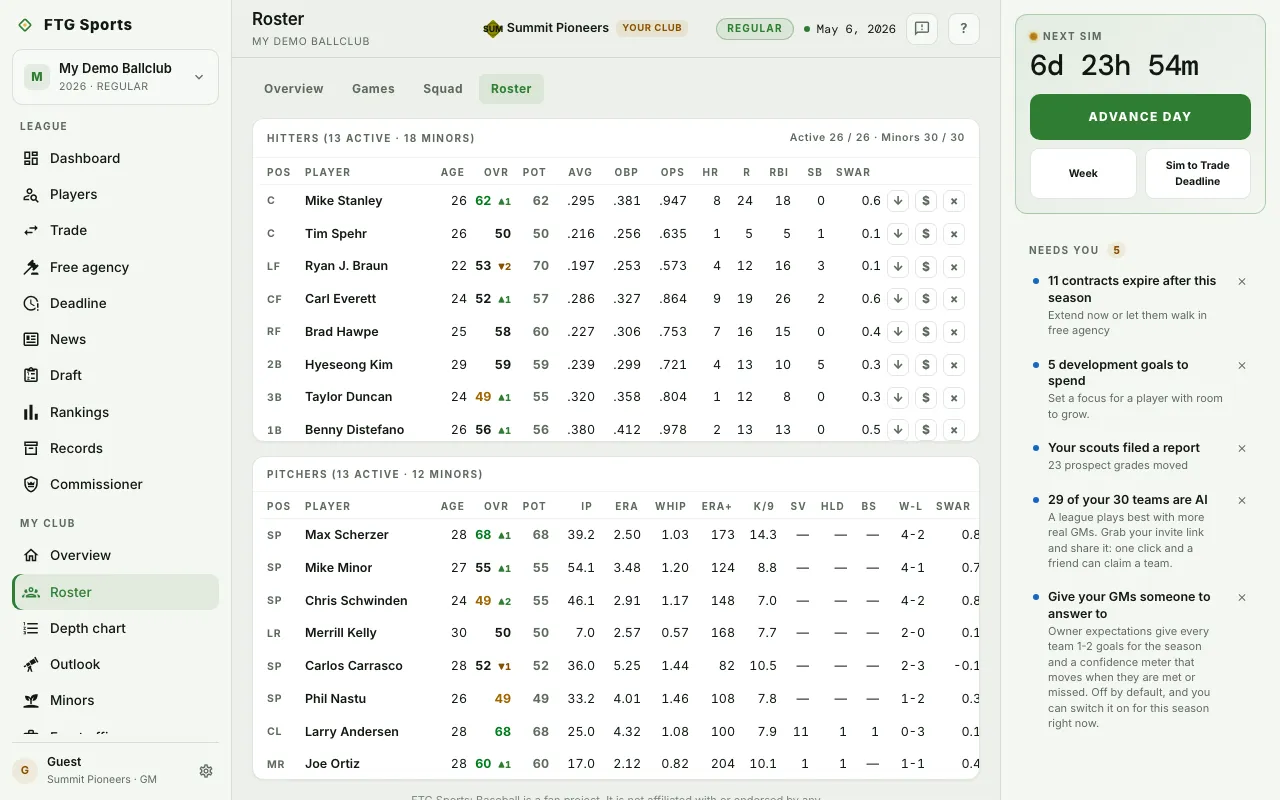 Two tables: Hitters and Pitchers. Each lists active players first, then Minors players, who carry a MINORS badge.
The Hitters header has a summary line: active players against the active limit, day-to-day count, IL count, and Minors players against the Minors limit.
Every row shows Pos, Player, Age, Ovr and Pot. Hitters also show AVG, OBP, OPS, HR, R, RBI, SB and sWAR. Pitchers also show IP, ERA, WHIP, ERA+, K/9, SV, HLD, BS, W-L and sWAR.
Badges next to a name:
- IL: on the injured list, so the player does not count against the active roster.
- DTD or IL with a day count: a short injury or a longer one.
- RETIRED: a career-ending injury. The player leaves the roster in the offseason.
- PROMISE: the club owes the player a promise. Hover to see which.
- NO-TRADE: the player has a no-trade clause. Hover to see the rule.
An arrow beside Ovr shows how far the grade has moved this season.
What you can do
- Column heading: sort that table by the column. Click again to reverse.
- A player row: open the player's page.
- Call up to majors (up arrow): move a Minors player to the active roster. For a player on the injured list, the same button reads Activate from the IL.
- Send to the minors (down arrow): move an active player down.
- Offer extension ($): open the extension offer.
- Release (x): open the release dialog.
If a move would break a promise, the game asks you to confirm first. The three row buttons show on your own club only. On another club you can read and sort.