Appearance
Depth chart
The depth chart sets who starts at each position, who pitches, and how your manager runs the lineup. The sim reads it every game day.
How to get here
- Open your league.
- In the left rail, under My club, click Depth chart.
What you see
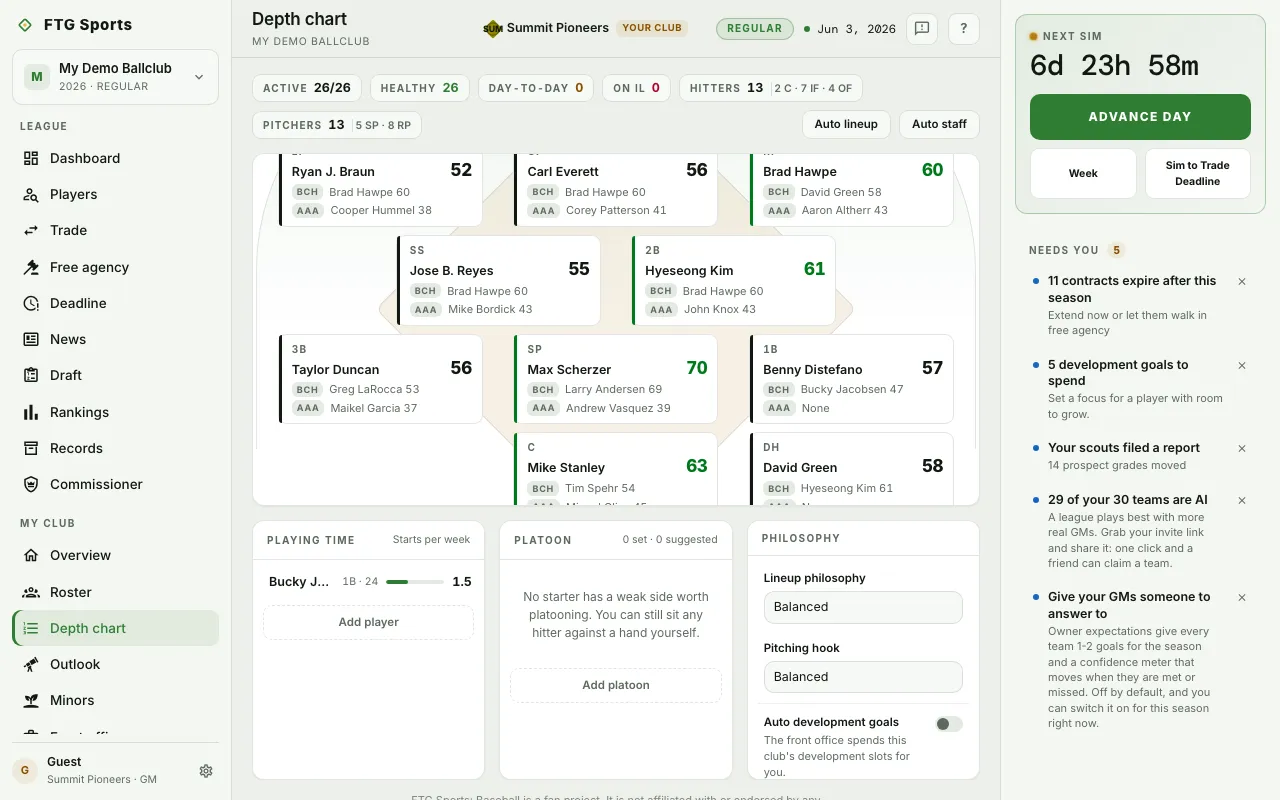
- Roster chips along the top: Active against the active limit, Healthy, Day-to-day, On IL, then Hitters (split into C, IF and OF) and Pitchers (split into SP and RP).
- The field: a card for each position and one for the pitching staff. A position card shows the starter and the starter's Ovr, a BCH line for the bench option and an AAA line for the farm option. An IL tag appears when players there are hurt.
- Playing time: prospects taking extra development starts, with starts per week as a bar.
- Platoon: the rules you have set, plus suggestions. A suggestion names who to sit against which hand, who starts instead, and the OVR gain.
- Philosophy: Lineup philosophy, Pitching hook and Auto development goals.
A warning shows above the board when a position is unfilled or a listed starter is on the IL. It adds that the sim improvises from your bench at any open slot. A second warning shows when a promised start is being broken.
What you can do
- Auto lineup: fill the batting positions for you.
- Auto staff: fill the rotation and bullpen for you.
- A position card: open its depth list. Drag players to reorder, use the arrows, remove a player, or add one with the Add to menu. The pitching card sets the rotation and the bullpen roles: Long, Middle, Setup and Closer.
- Playing-time share (batting depth list): set the share of starts a backup takes, or leave the backup on the bench.
- Platoon rule (batting depth list): choose Never, Sit vs LHP or Sit vs RHP.
- Add player (Playing time): pick a prospect for development starts.
- Apply (Platoon): turn a suggestion into a rule.
- x (Platoon): stop sitting a hitter against a hand.
- Add platoon: set a platoon rule yourself.
- Lineup philosophy: choose Balanced, Traditional or Sabermetric.
- Pitching hook: choose Quick hook, Balanced or Slow hook.
- Auto development goals: when on, the front office spends your development slots.
- Save and Discard: a bar appears at the bottom when you have unsaved changes. Nothing counts until you click Save.
You can edit the chart on your own club only.