Appearance
Player
The player card is the full page for one player. It holds the player's ratings, this season's line, career, contract and the actions you can take on the player.
How to get here
- Click any player name anywhere in the game. You can also open Players in the League group and click a name there.
- The ‹ Players link at the top returns you to where you came from.
What you see
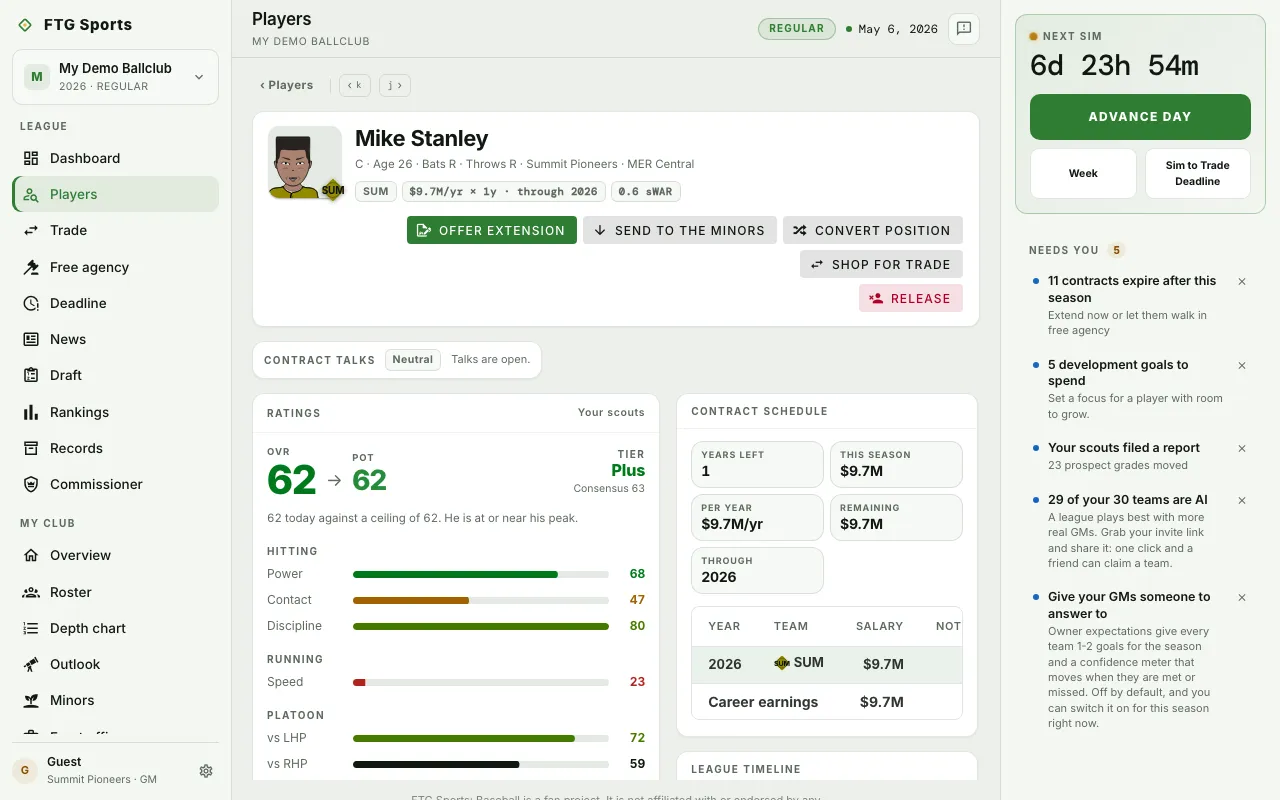
- Identity card: name, details and chips for the player, with the player's action buttons.
- Ratings: OVR, POT and the consensus grade, then tool grades in groups. A Your scouts label shows when the player is on your roster. Extra blocks appear when they apply: Scouting note, Personality and Trophy case.
- This season: stat tiles for the current season (a pitcher's tiles include FIP), with a Pace block during the season and a By club table for players who changed clubs.
- Recent games: the player's latest games. Click a game to open its box score.
- Career: a table by year and club, with a Career total row. Under it, Past seasons lists each year as a link.
- Contract schedule: the player's contract, or "No live contract on the books." A deal with extra terms adds a line, such as "Club option 2030", "Player option 2030" or "75% guaranteed".
- League timeline and Grade timeline: events and grade history for the player.
- Development: a goal for the player. Only the club that rosters the player can assign one.
What you can do
The buttons depend on whose player it is.
- ‹ and › (keys k and j): move to the previous or next player on the roster, when you opened the player from a roster.
- Offer extension: your active player. Opens an extension offer. It is disabled if an extension is already on the books. The offer can carry an Option year and a Guaranteed share. See Contract terms.
- Exercise and Decline: your player with a club option for next season, from the playoffs until the Options & expirations step of the offseason. Exercise keeps the option year and needs cap room for it. Decline drops the year, and your club pays a 10% buyout as dead money.
- Promote to majors: your minor-league player. Moves the player up to the active roster.
- Propose trade: another club's player. Takes you to the trade screen.
- Send to the minors: your active player. Moves the player down.
- Convert position: your player, when a position change is possible.
- Shop for trade: your player. Takes you to the trade screen to look for offers.
- Release: your player. Opens a confirmation. It cannot be undone. The dead money depends on how much of the deal is guaranteed.
- Ask him where he'd go: if the player has a no-trade clause on your roster, asks which clubs the player would accept.
- Past seasons link: opens that season's review. See Player season retrospective.