Appearance
Minors
Minors shows your farm system: how prospects are trending, a table of every Minors player, and suggested position moves.
How to get here
- Open your league.
- In the left rail, under My club, click Minors.
What you see
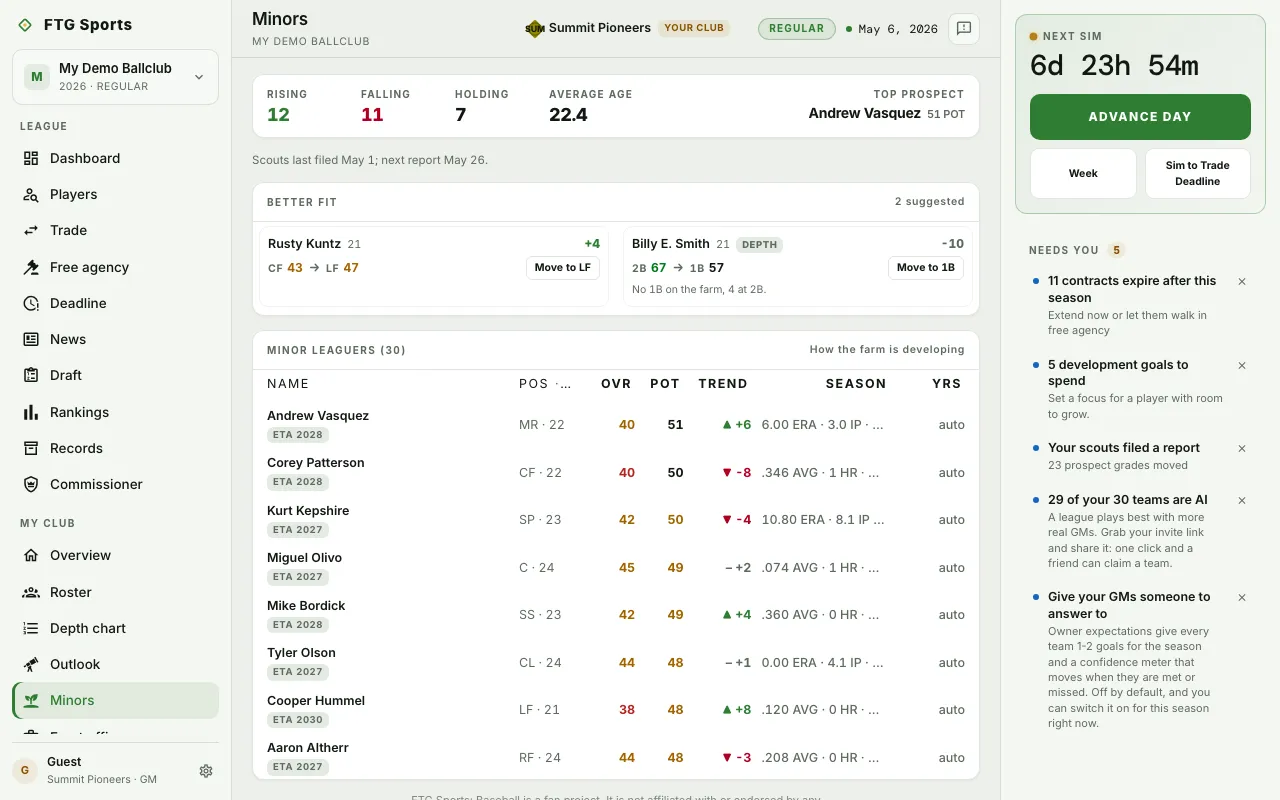
- Summary tiles: Rising, Falling and Holding (farmhands by direction), Average age, and Top prospect with the prospect's POT.
- Status line: when your scouts file their next report, or that no grade has moved yet.
- Better fit: suggested position moves. Each shows the player, the age, the grade change, and the old and new position with a grade for each. A Depth tag marks a move that helps the farm cover a spot and may cost the player grade points. A reason sits under the move.
- Minor leaguers: a table of Name, Pos, Age, OVR, POT, Trend, Season and Yrs. Season shows a hitter's batting line or a pitcher's pitching line.
What you can do
- Move to (position): in Better fit, click once to arm the move. The button then reads Confirm (position). Click again to make the change. The button shows on your own club only.
- Column heading: sort by Name, Pos, Age, OVR, POT, Trend or Yrs. Click again to reverse. Season does not sort.
- A player row: open the player's page.
A converted player starts at a set grade in the new spot and improves as the player plays there. The line under the suggestion gives that grade and says whether it is the season or the offseason.