Appearance
Draft
Use the draft room to pick prospects when your club is on the clock. You can also build a queue of players you want.
How to get here
- Open the League group in the navigation.
- Click Draft.
If no draft is running, the screen says "No draft is running. The draft room opens in the offseason, after the playoffs." A See farm rankings link takes you to Farm rankings.
What you see
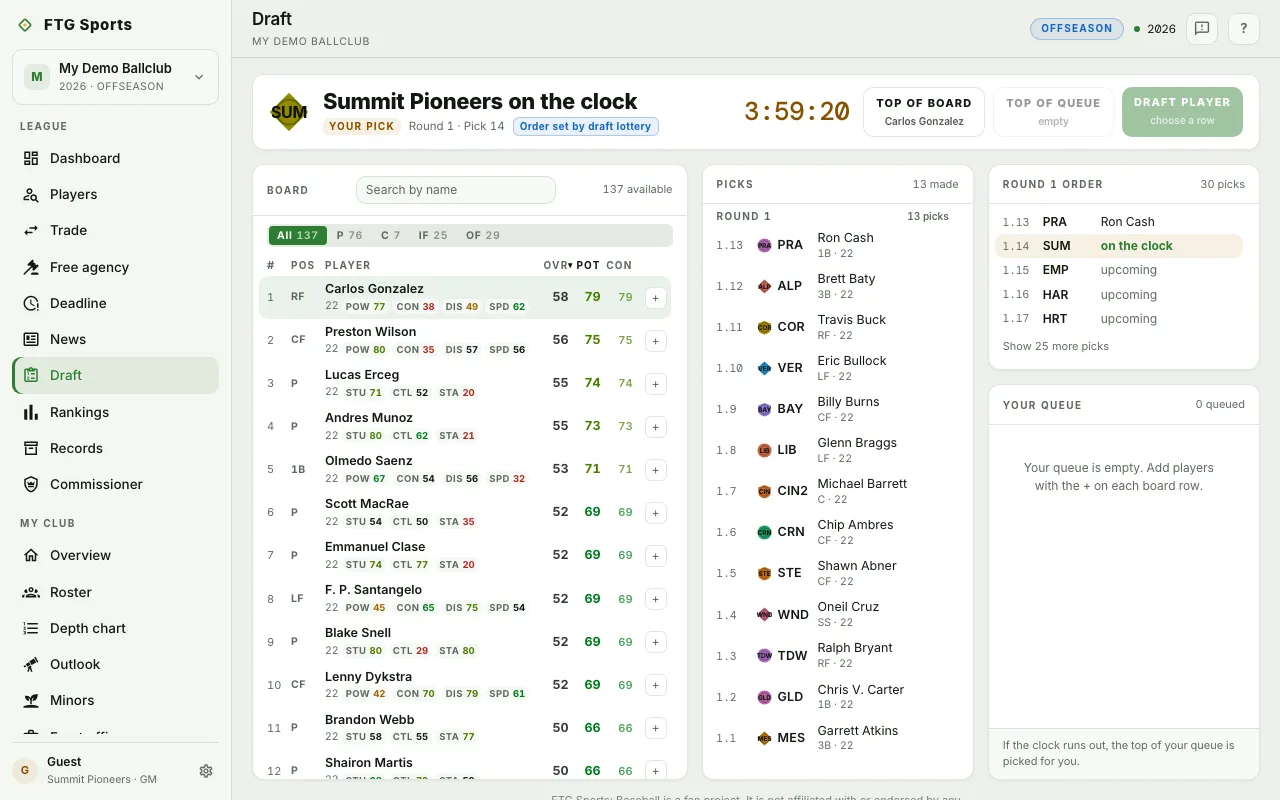
- Header strip: the club on the clock, with a Your pick tag when it is you. It shows the pick number, how many picks until your turn, and Order set by draft lottery when a lottery set the order. A countdown timer sits at the right.
- Board: every player still available, with a search box ("Search by name") and a count of how many are left. Position buttons (All, P, C, IF, OF, and DH when a DH is in the pool) filter the list. Each row shows rank, position, name, age, tool grades, OVR, POT, and Con. A dotted line under POT means that grade is your scouts' read, not the market's.
- Picks: every pick made so far, grouped by round, with a "made" count.
- Round order: the pick order for the current round. Each slot reads as picked, on the clock, or upcoming. An auto tag marks a club on autopilot. Use the Show … more picks button to unfold the rest of the round.
- Your queue: your ranked wish list, with a count of queued players.
What you can do
- Search by name: narrows the board to matching players.
- Position buttons: show only that position group. The number on each button is how many players it holds.
- Column headers (Pos, Player, OVR, POT, Con): click one to sort the board by it. Click again to reverse the order.
- Board row: click a row to select that player and read the player's details. You can open the full profile from there.
- + on a board row: adds the player to your queue. It turns into a check mark once the player is queued. Click it again to remove the player.
- Top of board: drafts the player at the top of the board by POT. It is disabled when the board is empty.
- Top of queue: drafts the highest player on your queue who is still available. It is disabled when nobody queued is left.
- Draft player: drafts the player you selected on the board. It is disabled until you pick a row.
- Confirm pick: every draft button opens a confirmation first. Click the Draft button in the dialog to finish, or Cancel. A pick cannot be undone.
- Up and down arrows in your queue: move a player one place up or down.
- ✕ in your queue: removes a player from your queue.
You can only draft when your club is on the clock. At any other time the screen shows "Your club is not on the clock."