Appearance
Commissioner
This screen is visible only to the league commissioner. The commissioner uses it to manage club owners, change league settings, veto trades and delete the league.
Anyone else who opens it sees "Only the commissioner can open this page."
How to get here
- Open the League group in the navigation.
- Click Commissioner. The item appears only if you are the commissioner.
What you see
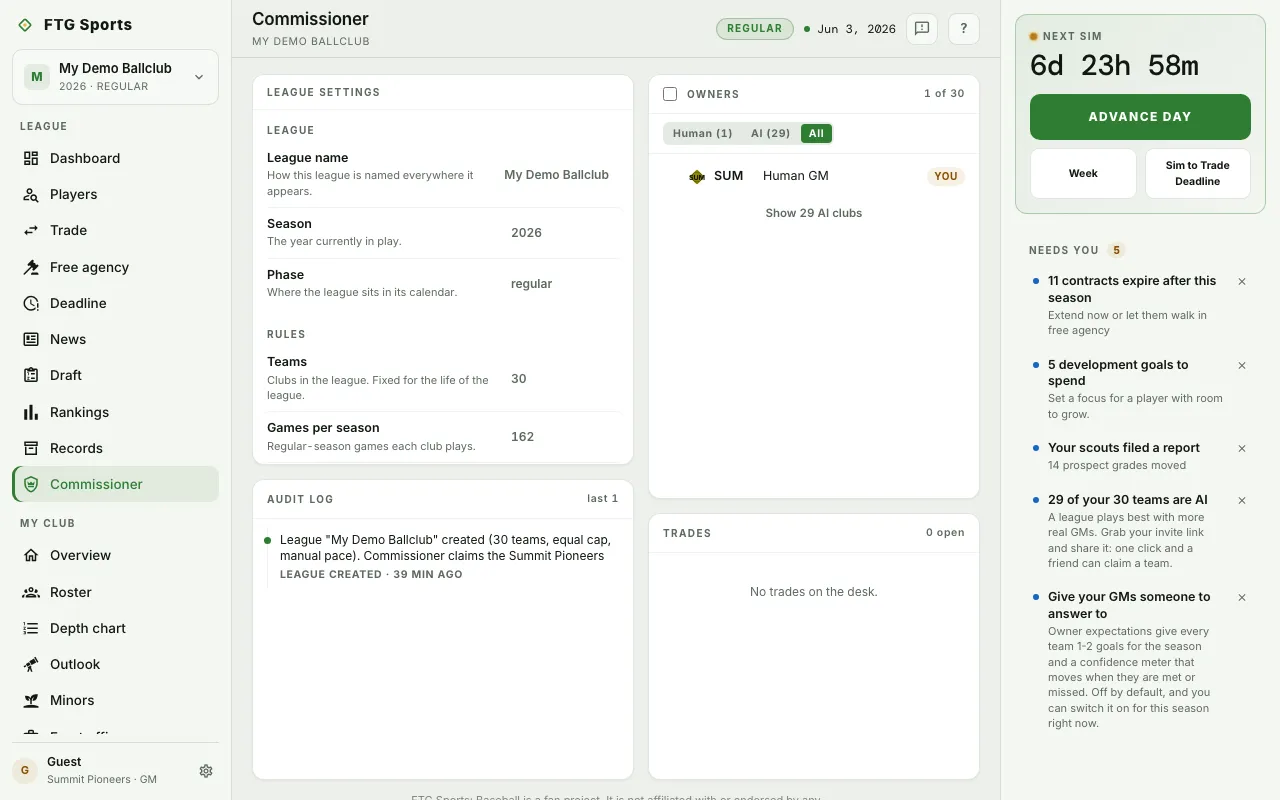
- League settings: grouped rows. League shows the league name, Season and Phase, and Rules lists the settings chosen when the league was created. These are read-only. Owner expectations and Negotiations are the two rows you can change. For a guest account both rows are read-only and say "Save your account to switch owner expectations on or off."
- Audit log: a record of admin events such as owner changes, takeovers, draft runs and vetoes.
- Owners: every club with its owner and role. Buttons at the top filter the list: Human, AI and All, each with a count. Clubs run by the engine are folded away under Show … AI clubs. At the bottom are the invite buttons, when an invite link is available.
- Trades: recent deals, each with a veto button while a veto is still allowed.
- Danger zone: a collapsed section at the bottom. It does not appear for guest accounts.
What you can do
- Owner expectations row: opens a choice between "Off, no owner goals" and "On, goals and confidence meter". Click Save expectations. It applies at once.
- Negotiations row: opens a choice between Full negotiations and Simple offers. Click Save negotiations. It takes effect on your next offer. Neither row opens for a guest account.
- Click a club in Owners: opens a panel for that club with these actions:
- Flip to AI hands a human club to the engine. Restore human reverses it for an AI club.
- Identity edits the club's identity, where the league allows it.
- Assign a GM puts a member in charge of an AI-run club.
- Reassign moves an owner to another AI-run club. The old club goes back to AI control.
- Remove takes an owner out of the league and the club goes back to AI control. You cannot remove your own club. The owner can be invited again later.
- Select clubs with the check boxes: then use Flip … to AI or Restore … to human to change several at once. Mixed selections are not allowed, so narrow the list to one kind of owner.
- Copy invite link, Copy invitation message and Share…: send the invite link. Anyone with the link can join and take an AI-run club.
- Veto trade: reverses a completed deal and sends every player back to the club that sent the player. If an AI club released a farmhand to make room for the deal, the veto brings him back too, with his contract, trade-block listing, pending offers and promises, unless another club has signed him since. Neither club can undo it. A veto is allowed only until the next sim day runs.
- Danger zone, then Delete league: deletes every season, player and record, with no undo. You must type the league name to confirm.