Appearance
Outlook
Outlook shows where your club is strong, where it is thin, and who is set to fill each spot over five seasons. Use it to decide whether to buy, hold or sell before the deadline.
How to get here
- Open your league.
- In the left rail, under My club, click Outlook.
What you see
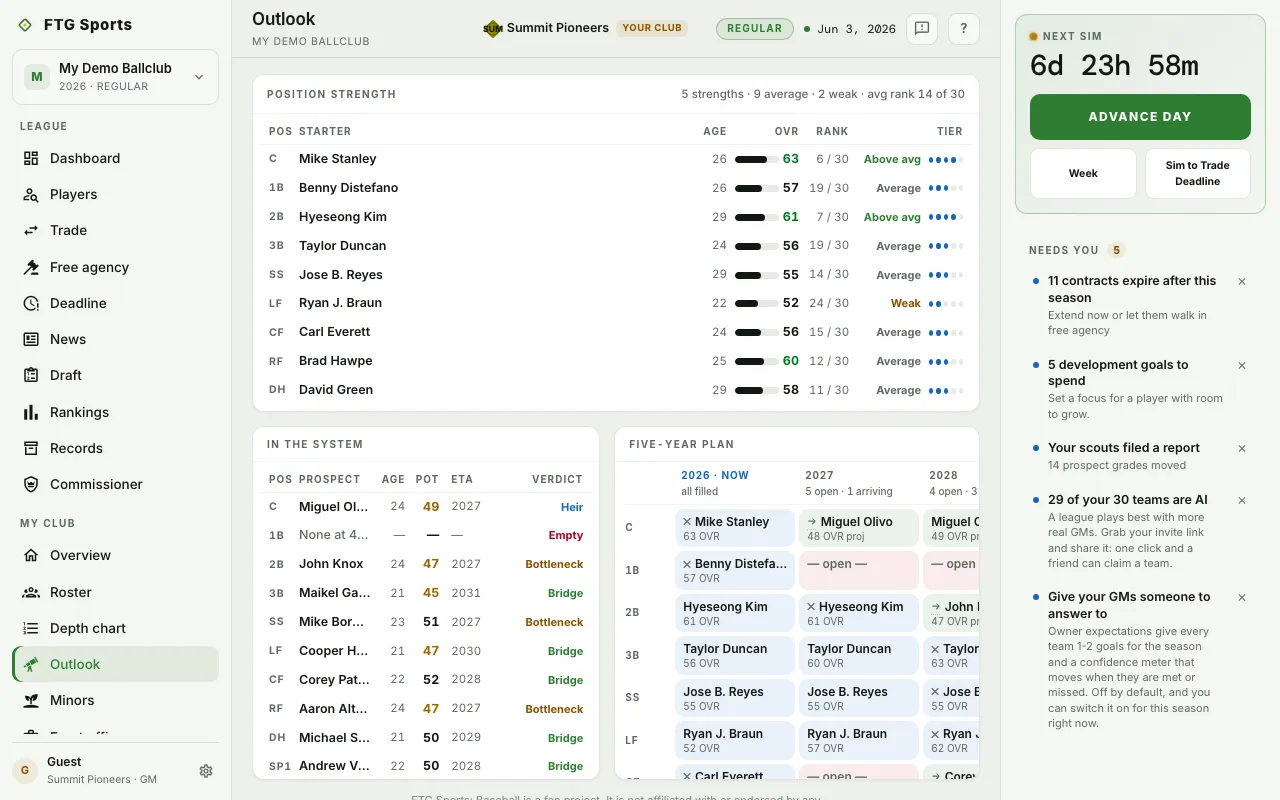
- Position strength: a row for each slot with Pos, Starter, Age, OVR, a bar, the player's rank against every other club's player in that slot, and a verdict. The header counts your strengths, average spots, weak spots and holes, and gives your average rank.
- In the system: the best Minors player at each slot, with POT, when the player arrives (Ready if the player can play now), and a verdict: Heir, Bridge, Bottleneck, Org depth or Empty. Hover a verdict for the full wording. A slot with no prospect at 40 POT or better reads None at 40+ POT.
- Five-year plan: slots down the side, seasons across the top. Each cell shows who holds the spot. An arrow marks a prospect arriving. A cross marks a contract ending. A legend under the grid explains the cell colors.
What you can do
- A row in Position strength: open that starter's page.
- A prospect in In the system: open the player's page.
- A name in the Five-year plan: open the player's page.
- Hover an abbreviated label: see the full wording.
Outlook has no buttons that change your roster.