Appearance
Dashboard
The Dashboard is the home screen of a league. It shows your club, the standings and what is happening now. Its layout changes with the phase of the season.
How to get here
- Open a league from Leagues.
- Select Dashboard under League. It is the first item.
What you see
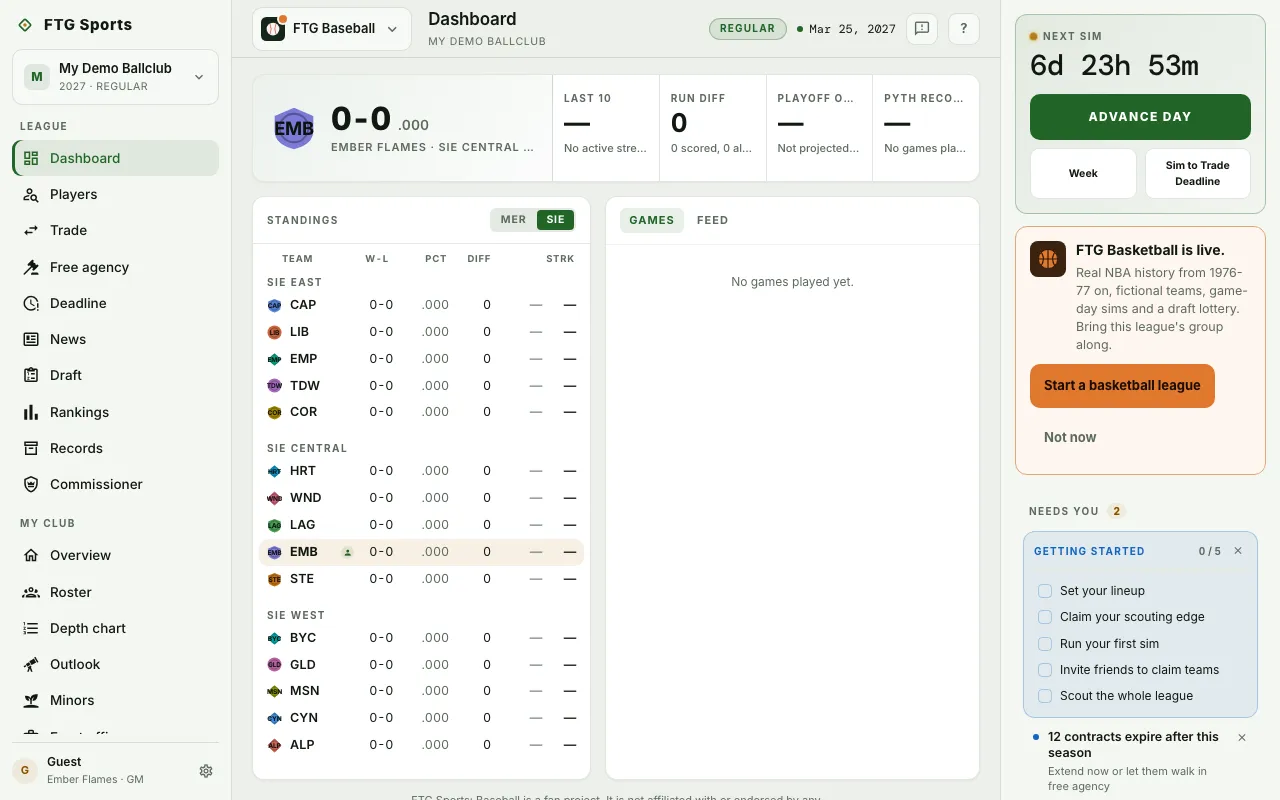
- Club header across the top, with four tiles: Last 10, Run diff, Playoff odds and Pyth record.
- FTG Basketball is live. card, on the right on a wide screen or at the top of the screen on a smaller one, until you hide it.
- Run diff notes the runs scored and allowed.
- Playoff odds reads "Not projected yet" until the league has a projection.
- Pyth record says how many wins better or worse than expected your record is.
- Champion banner under the header once the league has a champion. It ends with "Hang the pennant."
- Standings on the left in the regular season. Columns are TEAM, W-L, PCT, DIFF, PYTH, L10 and STRK. PYTH shows only once the league has a projection. A mark flags clubs run by a human. It reads "No standings yet." before games start.
- Games feed on the right in the regular season, with the tabs Games, Feed, Beat, Awards and Odds. Beat, Awards and Odds show only when the league has content for them. Games reads "No games played yet." when empty.
- Postseason in the playoffs. It shows the bracket in four columns: Wild Card, Div Series, Champ Series and Championship. The games feed sits beside it with a Final standings tab.
- Offseason calendar in the offseason. It lists the steps of the winter, and a shorter Final standings table stays beside it.
- Day complete card after you advance. It lists the scores and marks your own game with Yours.
- Club option decision rows from the playoffs until the Options & expirations step of the offseason. Each row names one of your players with an open club option. Select the row to open his page and decide. The email you get after a sim also lists open club options.
What you can do
- Advance the sim: the bar at the bottom of the screen shows Next sim with a countdown, a main advance button and, in the playoffs, a one-day button. The labels change with the league, so this page does not name them. A greyed-out button means the sim is busy or cannot advance.
- League half toggle (MER and SIE): switches the standings between the Meridian League and the Sierra League. It opens on the half your club plays in.
- Select a team or player: opens that page.
- Select a game: opens its box score, which has a Decisive plays section.
- Select an offseason step that waits on you: opens the Draft, Free agency or your team page, depending on the step.
- Dismiss: closes the Day complete card.
- Start a basketball league on the FTG Basketball is live. card: opens FTG Basketball.
- Not now on the same card: hides it for 30 days. The game switcher still lists FTG Basketball.
- Retry and My leagues: shown if the league fails to load. Retry tries again, My leagues goes back to the list.