Appearance
Chemistry
Chemistry shows the mood of your clubhouse: how each player feels, which personalities are in the room, and what stories are running.
How to get here
- Open your league.
- In the left rail, under My club, click Chemistry.
What you see
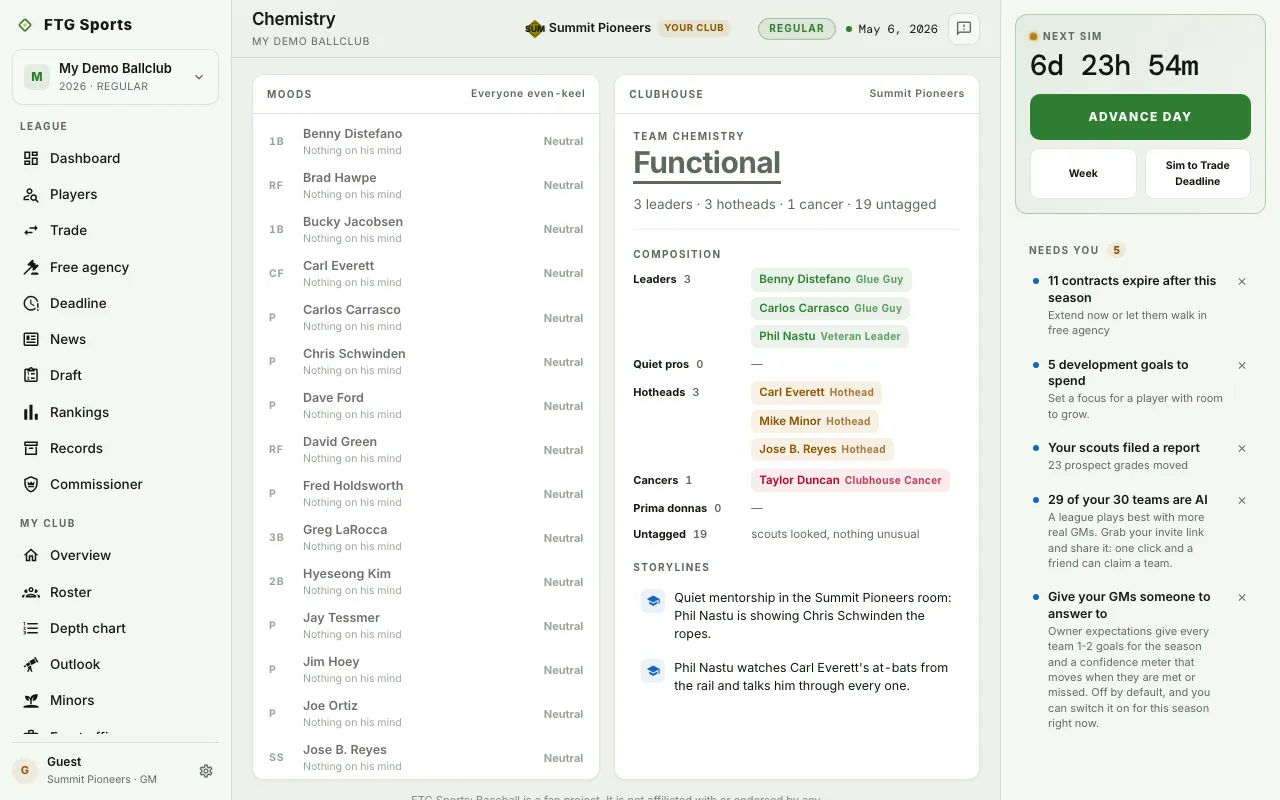
- Moods: a row for each active player, worst mood first. A row has the position, name, a short reason, and the mood: Furious, Unhappy, Neutral, Content or Thrilled. Wants out flags a trade request. Promised flags an open promise.
- Clubhouse: the Team chemistry verdict with a summary line.
- Composition: players grouped as Leaders, Quiet pros, Hotheads, Cancers and Prima donnas, each with a count. Untagged counts players with no personality tag.
- Storylines: feuds, friendships, mentorships and dustups. The pane says so when the season has given the room nothing yet.
Only the club's own GM sees moods and detail. On another club you see its Team chemistry verdict only.
What you can do
- A player row in Moods: open the player's page.
- A player chip in Composition: open the player's page. Hover for detail.
Chemistry is read-only. Act on what you learn from the Roster or in Trades.