Appearance
Players
Players is the league-wide player list. Search and filter every player in the league, then open a player to read more or act.
How to get here
- Open your league.
- Select Players under the League group in the navigation.
What you see
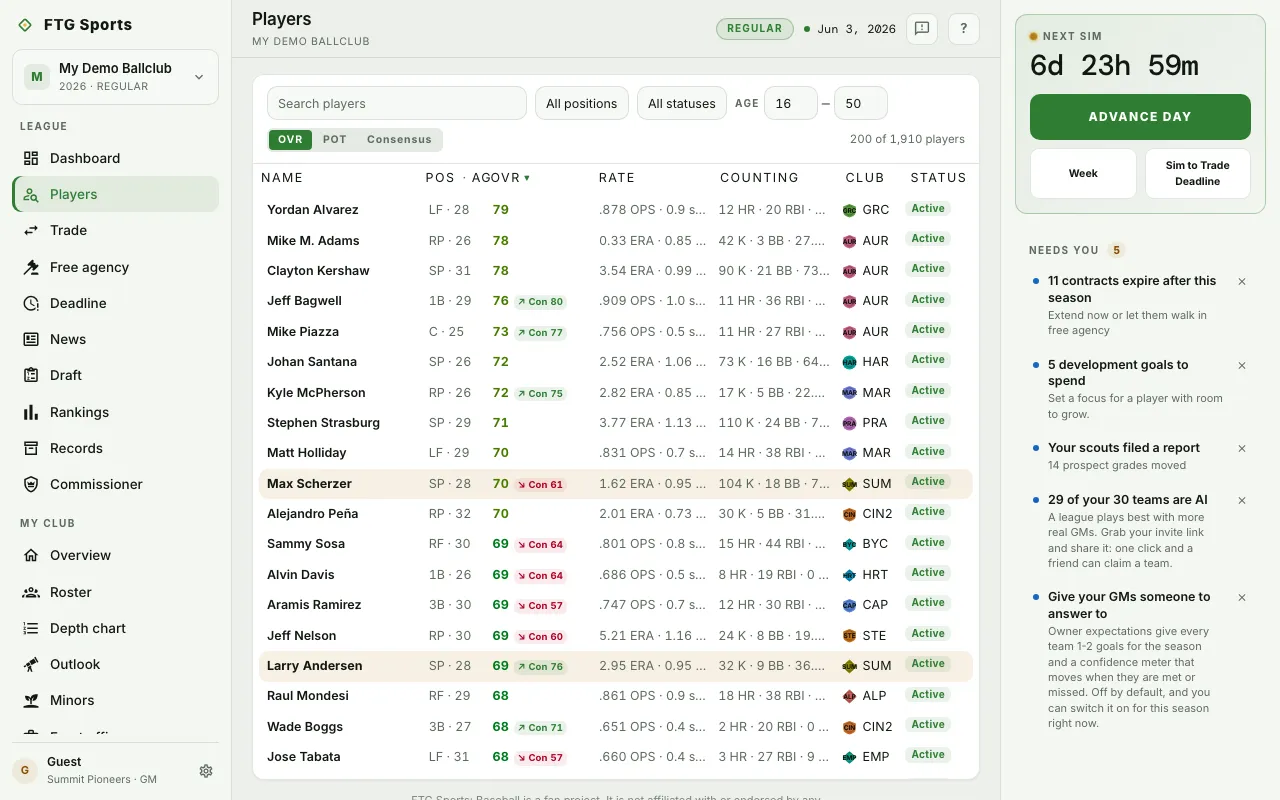
- Filter bar at the top. It has a Search players box, a Position list (All positions, C, 1B, 2B, 3B, SS, LF, CF, RF, DH, SP, RP), a Status list (All statuses, Active, Minors, Free agent, Day to day, On IL, Retired) and an Age range with youngest and oldest boxes.
- Rate players by buttons: OVR, POT and Consensus. When you filter to pitchers, Stuff, Control and Stamina join them.
- Player count next to the buttons.
- Table with the columns Name, Pos and Age, the rating you chose, Rate, Counting, Club and Status. Your own players are highlighted. "No players match these filters." shows when nothing fits.
- Player panel that opens when you select a row. It shows Tools and a Scouting note when the player has them.
What you can do
- Search and filter: narrow the list with the search box, position, status and age.
- Clear filters: resets every filter. It shows only while a filter is on.
- Sort: select the Name, Pos, Age or rating heading to sort by it. Select again to flip the order.
- Load more players: loads the next batch.
- Sign: in the player panel, regular season only, for a free agent. Select it to open the signing offer. In the playoffs the button is not there. In the offseason you bid on free agents on the Free agency screen instead.
- Draft: in the player panel, when the player is a draft prospect you can pick.
- Add to trade: in the player panel. It puts the player in a deal. Draft prospects do not have it.
- Full profile: opens the player's own page.